1
LTECH
ZHUHAI LTECH ELECTRONIC TECHNOLOGY CO., LTD.
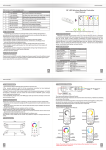
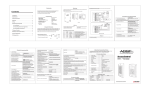
6. Operating Instruction for Remote Control :
Speed/Brightness+
Scene-mode II
(Press 2S and save)
A. Dimming
Speed/Brightness-
Single LED Strip
Power
Adapter
Touch
Color Circle
Touch
Color Circle
LTECH
LT@LTECHONLINE.COM
7. Wiring Diagram:
M1/M2/M3/M5 sleep mode: when the touch remote unattended operation over 30s, it can automatically enter
standby mode to extend battery life. press any of these four keys to continue.
Scene-mode I
(Press 2S and save)
WWW.LTECHONLINE.COM
M3-3A
Delay Off
ON/OFF
Mode Key
ON/OFF
+
NW( neutral white)
-WW(warm white)
smooth
Dimming
DC12
-
NW-WW CT
V
DC
+
-
Speed/Brightness-
Speed/Brightness+
Speed/Brightness-
Speed/Brightness+
Touch
Color Circle
12
V
Figure A
Touch
Color Circle
ON/OFF
Mode Key
ON/OFF
Mode Key
(Change the modes
in sequence)
Switch among 3 kinds
CT smooth in
sequence,
NW-WW smooth,
NW-CW smooth,
CW-WW smooth.
RGB
Power
Adapter
CW-NW-WW CT
Tables of Changing Mode:
1.
2.
3.
4.
Static
Static
Static
Static
Red
Green
Blue
Yellow
5.
6.
7.
8.
Static Purple
Static Cyan
Static White
RGB Skipping
9. 7 Colors Skipping
10. RGB Color Smooth
11. Full-color Smooth
DC
-
Single LED Strip
+
12V
M3-3A
DC
-
+
Single LED Strip
12V
Loop Play
Color
Shortcut Key
ON/OFF
Mode
Shortcut Key
ON/OFF
DC
-
Speed+/SpeedBrightness+/-
Speed/Brightness+
Speed/Brightness-
Mode
Shortcut Key
DC
Loop Play
Color
Shortcut Key
RGB Brightness +/-
Figure B
RGB
RGB
3
4
Single LED Strip
+
-
Scene-mode Key
(Press 2S and save)
+
12V
12
V