1
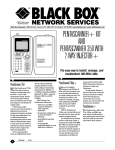
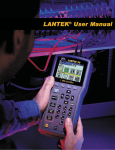
The PentaScanner’s Components
Test Connector
BNC Jack
PentaScanner
Graphical Display
Function Keys
There are 4 basic function
keys. Each function
depends on which screen
is currently displayed.
100MHz
F1
Escape
F2
F3
F4
ESCAPE
Exits the current
display or function.
Autotest
Allows user-definable,
all-day testing (up to
500 tests).
On/Off
Press and hold to display
version and serial numbers;
press and release to backlight
the display.
Arrow Keys
Allow navigation within
displays.
AUTOTEST
Find Cable Faults
1
2
3
Find Cable
Faults
Alphanumeric Keys
Pressing these keys allows
alpha and numeric characters
to be entered into the display.
In some displays, numeric
keys are used for direct-dial
menu selections.
Backlight
4
5
6
7
8
9
A-Z
0
ENTER
ON/OFF
Measure Cable
Performance
Locates opens, shorts, split
pairs, and miswires.
Measure Cable
Performance
Runs individual tests.
Analyse
LAN Traffic
Extended
Functions
HELP
Analyse LAN Traffic
Monitors network traffic.
Extended Functions
Customises user preferences,
Autotests, and calibration.
Powers the Scanner on or off.
Help
Context-sensitive help
provides additional
information on the current
screen when pressed during
any function.
3
DB9 Serial Connector
AC Plug
Allows attachment of a serial
communications cable for
printing or for updating the
Scanner’s software.
Permits an AC adapter to be
used as a power source and
for recharging the battery.