1
Chapter 3 Operation
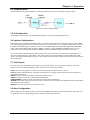
3.4 Loopback Mode
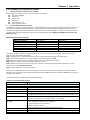
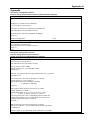
The IPM provides two types of loopback: "T1 Remote Loopback" and "T1 Local Loopback". (Figure below.) Figure 3.4‐1 IPM T1 Loopback Mode 3.5 IP Configuration
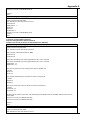
The IP address, subnet mask, and default gateway address can be setup through RS232/Telnet. 3.6 Interface Configuration
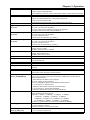
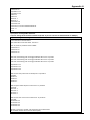
LAN Ethernet port provides the bandwidth control. This feature allows users to limit the data rate from LAN to WAN port. Implementing this feature is to ensure the quality of service in TDM circuits. For different applications, there are 16 different bandwidth options available for users to choose (50K, 100K, 150K, 200K, 250K, 300K, 350K, 400K, 800K, 1.6M, 3.2M, 6.4M, 12.8M, 25.6M, 51.2M and 100M). In addition, setting a 100Mbps bandwidth option is to only utilize the rest of the available bandwidth of 100Mbps minus the bandwidth being reserved for all T1 traffic. For the T1 interface, the LEDs will be lit after enabling the T1 channel and user can map to the remote different T1 channel for flexible selection. Jitter Buffer is also used to overcome the packet delay variations between two LAN devices, including 8 available options of 11, 23, 40, 75, 99, 145, 192 and 239 ms based on the standard Ethernet frame size of 1518 bytes. 3.7 Fault Report
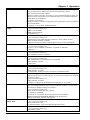
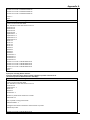
T1 active alarms can be displayed by executing a CLI command "almall". This information is useful to a technical support person who performs diagnostic tasks. The alarms are interpreted as follows: T1LOS: Loss of receiving signal of T1 from the upstream equipment connected to the T1 port. T1AIS: AIS (Alarm Indication Signal, a message consisting of all "1"s) signal received from the upstream equipment connected to the T1 port. PWLBIT: T1 LOS or AIS alarm has been raised at the remote T1 port. PWRBIT: Packets loss occurred at remote Ethernet WAN port. PWSEQNUMERR: Packets received out of sequence at local Ethernet WAN port. JBUFEMP: Jitter buffer empty occurred at the T1 port. (Possible reasons could be due to WAN port Ethernet link down or pseudowire ID mismatched.) JBUFOV: Jitter buffer overflow occurred at the T1 port. 3.8 Save Configuration
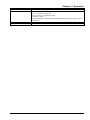
After changing any settings of the device, please execute csave command to save the new settings to the device. This can prevent all of your settings being lost if you reboot or power cycle the device. 13