1
Maintenance | 176
Terminal upgrades
You can upgrade all software for both terminals remotely (through a management network), which
eliminates the need to physically visit either end of the link.
The best method of upgrading a terminal is to use the TFTP server method (see “Upgrading the
terminal using TFTP” on page 177). This method downloads all the required image files into the
terminal and then activates the correct files following a terminal reboot.
A terminal can also be upgraded by download all the required system software files (see “Upgrading
the terminal by uploading system files” on page 182”).
Upgrade process
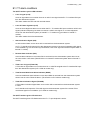
To minimize disruption of link traffic and prevent your terminals from being rendered inoperative,
please follow the procedures described in this section together with any additional information or
instructions supplied with the upgrade package.
Before upgrading the terminal, ensure that you have saved the configuration file (see "Saving the
terminal's configuration" on page 66) as well as the cross connection configuration (see "Saving cross
connection configurations" on page 130).
The Remote terminal upgrade process will be faster if the bandwidth allocated to the management
ethernet capacity is maximized.
The terminal software must be identical at both ends of the link.
At the end of the terminal upgrade process, the versions of image files (kernel software, and firmware)
that were in use before the upgrade are still in the terminal. You can restore them, if required, by
editing the image tables and reactivating the old files (see “Changing the status of an image ” on page
188).
IMPORTANT NOTE: Ensure you are logged into the Near end terminal before you start an upgrade.
Installing RF synthesizer configuration files
If you are upgrading from software version 5_x_x or greater, refer to “Upgrading the terminal using
TFTP” on page 177).
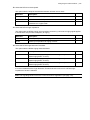
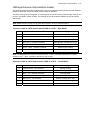
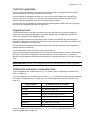
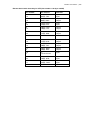
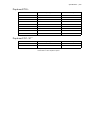
If you are upgrading from a software version prior to 7_1_x, you will need to install new RF synthesizer
files, refer to “Configuration files” on page 182. You can then upgrade the terminal using TFTP (on
page 177).
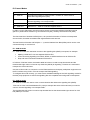
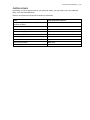
Frequency Band
Synthesizer File(to be installed)
300 MHz
XE_300_400_synth.cfg
400 MHz
XE_300_400_synth.cfg
700 MHz
XE_600_700_800_900_synth.cfg
800 MHz
XE_600_700_800_900_synth.cfg
900 MHz
XE_600_700_800_900_synth.cfg
1400 MHz
XE_1400_synth.cfg
2000 MHz
XE_2000_2500_synth.cfg
2500 MHz
XE_2000_2500_synth.cfg
If you are upgrading from software version 3_x_x or 4_x_x, refer to “Upgrading the terminal by
uploading system files” on page 182.