1
Micro-BX Call Logging Manual
Contents
Chapter 1 Introduction
2
4
Starting the Programme ................................ .......................................................................4
Shutting Down ................................ ................................ ................................ .....................4
Chapter
2 Logging The Calls
5
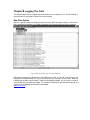
Raw Data Option ................................ ................................ ................................ .....................5
Translated Data (Menu Option) ................................................................ ...............................6
Details (Button) ....................................................................................................................7
Keep display updated: ) ................................ .......................................................................7
Help (Button) .......................................................................................................................7
Alarm Option (Menu Option)....................................................................................................8
Setting Alarms and Colours .................................................................................................8
Rate Information (Menu Option)...........................................................................................8
Invoice Pricing (Check Box) .................................................................................................9
Long Names (Check Box) ....................................................................................................9
Chapter
3 Processing the Data
10
Reports (Menu Option) ................................ ................................ ................................ ..........10
Moving Between Reports ...................................................................................................14
Entering the Parameters ....................................................................................................14
Display Report (Menu Option) ............................................................................................... 17
Print (Button) .....................................................................................................................18
Adjusting Columns (More>> Button) ..................................................................................18
Print Manager (Menu Option) ................................................................................................ 18
Selecting Reports ..............................................................................................................18
Font Size ...........................................................................................................................19
(Printer) Set up (Button) ................................ .....................................................................19
(Print) Selection Only (Button) ...........................................................................................19
(Print) All Reports (Button) ................................ ................................ ................................ .19
(Print) Rates Table (Button) ............................................................................................... 19
Selecting a Report File (Menu Option) ................................ ................................ ...............19
Editing All Reports (Button) ................................................................................................ 20
Deleting Reports (Menu Option) ................................ ................................ ........................20
Scheduled Printing (Menu Option).........................................................................................22
How to Set it Up.................................................................................................................22
Chapter
4 Nuts and Bolts
23
Options: Rates and Fees (Menu Option) – can be Password Protected ................................ 23
Editing the Pricing Parameters...........................................................................................23
Conceal Last 4 Digits (Check Box) ....................................................................................23
Conceal Pin in Number (Check Box) ..................................................................................23
Conceal Account Codes (Check Box) ................................................................................23
www.microbx.com