1
DO-08RL-uso-e
11-10-2011
16:25
Pagina 3
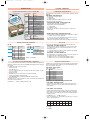
SDO Messages
Commands
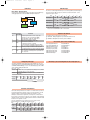
Index 200Ch – Operating mode:
the device has its own internal state machine. It is possible to move through this by
sending appropriate values to the Index 200Ch, following the table below.
The entries of a device Object Dictionary are accessed trough SDO (Service Data Object)
messages. The basic SDO messages are as follows, as based on the Client – Server
request and response model:
Byte
Read request
Ready
1
2
Run
4
3
Read response
Error
Write request
3
Write response
0
40h
4xh *
22h
60h
1
2
3
4
5
6
Sub-Index
Reserved
COB – ID = 600h + NodeID
Index
Sub-Index
Data
COB – ID = 580h + NodeID
Index
Sub-Index
Data
COB – ID = 600h + NodeID
Index
Sub-Index
Reserved
COB – ID = 580h + NodeID
Index
* This code is type dependant.
Please refer to the CIA DS301 Profile for more details.
Transition Operating
Behaviour
mode value
Init
At Power-Up, the Device is in the “ready” state.
Transition 1 is also executed if Index 200Ch Operating Mode contains the default value 1
1
01h
Operating mode “RUN” is activated
Return to the initialisation “ready” state.
The transition is performed:
2
00h
• following an operator’s command
• after assigning the configuration parameter (2003h)
The “error” state is automatically assigned by the device
3
FFh
(and the operating mode value is read only) when:
• an attempt is made to execute an unexpected command
This value causes an exit from the “error” state, after the
4
00h
error condition is acknowledged. The only transition is to
the “ready” state
The module automatically sends emergency messages including error codes. The
communication errors are descrided in CiA DS301 [1]. The error codes are expressed
as a DEVICE SPECIFIC ERROR type of code. The codes indicating a specific condition
are also inserted, following the table below:
Error code Error
0000000000 No error –This code is generated when exiting an error contidion,
to notify the end of one of the error states
0000000007 Error Wrong Command – An attempt to execute a command from an
illegal state
1
FFh
2
3
4
5
21h
00h
00h
00h
COB – ID = [entry 1014h] + NodeID
List of CiA documents to which the user should refer
[1] CiA DS301 - CANopen Application Layer and Communication Profile
[2] CiA DS401 - CANopen Device Profile for generic I/O Modules
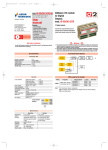
Accessories, Spare Parts and Warranty
Power Supply 45W 24Vdc 2A
Power Supply 120W 24Vdc 5A
Additional Terminal Block 2x11
Female Plug 11 Screw clamp
Female Plug 11 Spring clamp
RJ45 terminated cable 14cm
RJ45 terminated cable 22cm
CAN termination Adapter
AP-S2/AL-DR45-24
AP-S2/AL-DR120-24
AP-S2/TB-211-1
AP-S2/SPINA-V11
AP-S2/SPINA-M11
AP-S2/LOCAL-BUS76
AP-S2/LOCAL-BUS152
AP-S2/TERM-CAN
Warranty: 3 years excluding defects due to improper use
Emergency messages
0
Emergency 01h
Message
Reference documents
6
00h
7
0yh
Error code
Parameter Store/Restore
This module allows parameters to be saved in a non volatile memory. In order to
avoid storing parameters by mistake, storage is only executed when a specific
signature is written to the appropriate subindex. The signature is “save”.
Similarly, the default values of parameters, according to the communication or
device profile, are restored. On receipt of the correct signature in the appropriate
subindex, the device restores the default parameters and then confirms the SDO
transmission. The signature is “load”.
The new configuration becomes active after a reset, i.e. after a “Power
OFF/Power ON cycle” or an NMT “Reset Node” message.
Byte
0
1
2
3
4
5
6
7
22h
10h
10h
73h
61h
76h
65h
01h
Store
Parameter
s
a
v
e
COB – ID = 600h + NodeID
22h
11h
10h
6Ch
6Fh
61h
64h
01h
Restore
Parameter
l
o
a
d
COB – ID = 600h + NodeID
7