1
Page Table Setup
0
31
Effective Address
Segment Descriptor
Located
(T = 1)
Address Translation Disabled
(MSR[IR] = 0, or MSR[DR] = 0)
Match with BAT Registers
(T = 0)
Block Address Translation
Page Address Translation
0
51
Virtual Address
Direct-Store Segment
Translation
Real Addressing Mode
Effective Address = Physical
Address
Look Up in
Page Table
0
31 0
Implementation-Dependent
31
Physical Address
0
31 0
Physical Address
31
Physical Address
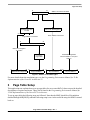
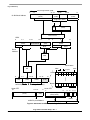
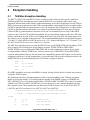
Figure 1. Address Translation Types
For more details about the translation types, see the Programming Environments Manual for 32-Bit
Implementations of the PowerPC Architecture™.
3
Page Table Setup
This application note explains how to set up page tables for use as extra BATs. It does not provide detailed
descriptions of registers and terms. These can be found in the Programming Environments Manual for
32-Bit Implementations of the PowerPC™ Architecture.
To set up page tables the following steps are followed. Note that the MMU should be off (translation
disabled through MSR[IR,ID]) when the following setup is run. At the end of the setup, the MMU is turned
back on.
Page Table Translation Setup, Rev. 1
Freescale Semiconductor
3