1
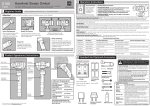
6 Function Interface Instructions
Please Remove
The Batteries
Before Upgrading
7 Video And Camera Charging Interface
Upgrade........
!
Function
Interface
USB Cable
Video And Camera Charging Interface
This interface can be output 5 voltage and analog video signal, it can power supply
for Gopro camera and output the analog video signal when connect the power
and video cable.
USB Connecter
Attention: Be sure to connect the computer with the USB connecter
PC
( This cable doesn’t includes in the standard package, it’s a optional item. )
Firmware Upgrade Instruction
Please visit the official website of Feiyu Tech: www.feiyu-tech.com to download the USB driver, firmware upgrade software and the latest
firmware then unzip the RAR file.Remove the batteries and refer to the connection diagram to connect the gimbal with the computer.
Please refer to the manual of update operation to upgrading,otherwise the Gimbal will be abnormal.
Attention : Please be sure to connect the computer with the USB connecter.
8 Initialize The FY-G4 Gimbal
Parameters Configuration
The heading following speed can be configurate through parameter setting software.User can adjust to the desired following speed mode
according to the requirements of filming scene. Three modes for optional: “SLOW” mode, “NORMAL” mode , “FAST” mode.
Default setting is “NORMAL” mode.
Initialization Instructions
Attention : Please be sure to connect the computer with the USB connecter.
Gimbal Calibration
The Gimbal attitude can be calibrate through parameter setting software. User can adjust the pitch and roll in a small angle to achieve more
accuracy filming scene. Please insert the batteries then refer to the connection diagram to connect the gimbal with the computer for caliration.
Attention : Please be sure to connect the computer with the USB connecter.
After connect the video cable, the
analog monitor connect to the
function interface then it will display
the video.
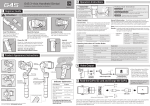
FY-G4 needs to be initialized whenever the
following situations appear after power on
Analog Monitor
Function Interface
Connect the remote control to the
function interface, heading & pitch
angle adjustment and mode switching
can be operation from a distance .
Remote Control
9 Extension Bar Instructions (Optional Item)
With the special designed switch, the extension bar can be added directly. Allows to shoot the distance
images more easily. Special design allows for flexible extension.
370mm
Φ23mm
Extension Bar Size
1. Install the camera properly.
2. Gimbal placed on stationary flat and keep
motionless.
3. Power on the Gimbal.
4. The Gimbal is activate and it will initialize
automatically. Pick up the Gimbal to work normally.
Motionless Flat Surface
1. After power on, the angle of pitch is not level with the horizon line.
2. After power on, the angle of roll is not parallel with the horizon line.
3. When the gimbal is in heading lock, the angle of heading moves frequently (heading is not stationary)
10 Specification
Items
Min
Standard
Max
Working Voltage
6.0V
8.4V
17.0V
Pitch Angle
Roll Angle
-160(Down)
-50
0(Horizontal)
0(Horizontal)
+160(Up)
+50
Handheld in horizontal
Heading Angle
-160(Left)
+160
Handheld in vertical
Heading Angle
-50
+50
Handheld in horizontal
Pitch Following Rate
2°/Sec
75°/Sec
Heading Following Rate
Static Attitude Tracking Accuracy
3°/Sec
0.01
0.02
150°/Sec
0.05
Gimbal in static mode
Motion Attitude Tracking Accuracy
0.1
0.2
0.5
Motor overload<2G
Overload Current Protection
Weight
800mA
265g
FY-G4 handheld Gimbal is an excellent camera stabilizer,lightweight and portable.
Prohibit any user for any illegal purpose.Users will be responsible for all behavior of
purchase and use products.
The Guilin Feiyu Electronic Technology Co. and our associates are not responsible
for any damages or liabilities caused by the use of this product.
If any comments or suggestions please do not hesitate
to e-mail us directly :service@feiyu-tech.com
Without batteries & camera
11 Attention
Disclaimer
Extension Bar Diagram
Remarks
For any unknown sources or using, we will not be any service.Feiyu Tech reserves
the right to amend this manual and the terms and conditions of use the Gimbal
at any time.
Attention :
Please correct assemble the gimbal according
to the diagram .
Please upgrading firmware and configurate
parameters with the standard configuration
USB date cable.
Please battery charging with the standard
configuration charger.
Please install the camera well before power
on the Gimbal.
Please visit the official website of Feiyu Tech
to get related information: www.feiyu-tech.com