1
SStep
t e p 1A
1 A
Note: The mounting components and hardware supplied in this package are not designed for walls
with steel studs or to cinder block walls. If the hardware you need for installation is not included,
please consult your local hardware store for proper mounting hardware for the application.
Mounting
Monitor
Brackets
a TV
Mounting
thethe
Monitor
Bracket
to a TV to
with
Flat with
Back Flat Back
To start,
make
suresure
the bolt
diameter (e,f,g,h)
fits your TV. Once
yourequires.
have determined
thehave
correct
diameter, see
First
of all,
make
the diameter
of the Bolt(e,f,g,h)
your TV
Once you
determined
the relative
correctdiagram
diameter,
below. see
Thread
bolt into
the TVas
using
the correct
washer
(s,t).the
Please
make
sureWasher(m,n,o,p)
the monitor brackets
please
thethe
relative
diagram
below.
You willlock
thread
the (m,n,o,p)
Bolt intoand
the washer
TV using
correct
Lock
and
(b,c) are vertically
centered
with eachBrackets(b,c)
other.
Washer(s,t).
Please
make and
surelevel
the Monitor
are vertically centered and level with each other.
M6M6
Diameter
D ia m e te Bolt
r B o lt
M4
M4 Diameter
D ia m e te r BBolt
o lt
e
g
m
o
s
t
b
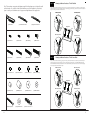
(1)Wall Plate-a
(1)Left Monitor Bracket-b
c
(1)Right Monitor Bracket-c
Diagram
D ia g r a m 11A
A
M5
M5Diameter
D ia m e te r BBolt
o lt
(4)M4x12 Bolt-e
(4)M5x12 Bolt-f
(4)M6x12 Bolt-g
(4)M8x16 Bolt-h
h
f
p
n
(4)M4x30 Bolt-i
(4)M5x30 Bolt-j
(4)M6x35 Bolt-k
(4)M8x40 Bolt-l
D ia m e teBolt
r B o lt
M8M8
Diameter
SStep
t e p 1B
1 B
s
t
b
c
Mounting
Monitor
Brackets
a TV
withBack
Curved Back
Mounting
thethe
Monitor
Bracket
to a TV to
with
Curved
To start,
make
suresure
the bolt
your TV. Once
determined
the correct
diameter, see
diagram
make
the diameter
diameter(i,j,k,l)
of thefits
Bolt(i,j,k,l)
youryou
TV have
requires.
First
of all,
Once you
have determined
therelative
correct
diameter,
below. Thread
bolt into
the TV using
the correct
lockthread
washerthe
(m,n,o,p)
andthe
washer
(s,t). For
thecorrect
M4 andLock
M5 diameter
bolts,
please
see thethe
relative
diagram
as below.
You will
Bolt into
TV using
the
Washer(m,n,o,p),
another M4/M5
will be needed
thediameter
monitor bracket
and
theneed
spacer.
PleaseM4/M5
make sure
the monitor
brackets
(b,c)
Washer(s,t)
andwasher
spacer(q,r).
For the between
M4 or M5
bolt, you
will
another
Washer
between
the Monitor
Bracket
and the
Spacer.
make
sure
the Monitor Brackets are vertically centered and level with each other.
are vertically
centered
andPlease
level with
each
other.
M4
M4Diameter
D ia m e te rBolt
B o lt
(4)M4 Lock Washer-m
(4)M5 Lock Washer-n
(4)M6 Lock Washer-o
(4)M8 Lock Washer-p
M6
M6Diameter
D ia m e te rBolt
B o lt
c
b
k
i
m
(4)M4/M5 Space-q
(4)M6/M8 Space-r
(8)M4/M5 Washer-s
(4)M6/M8 Washer-t
s
s
o
q
M5M5
Diameter
D ia m e teBolt
r B o lt
l
n
s
s
p
q
2
(6)M10x80 Concrete Anchor-x
t
r
c
b
(6)Lag Bolt Washer-w
r
M8
M8 Diameter
D ia m e te r BBolt
o lt
j
(6)M8x90 Lag Bolt-v
t
Diagram
D ia g r a m1B
1B
3
3