1
swru197c
Table of Contents
1
Introduction ............................................................................................................................3
2
Abbreviations and Acronyms ................................................................................................3
3
Box Contents..........................................................................................................................4
4
Operating Conditions of the CC Debugger ...........................................................................4
5
Initial Steps .............................................................................................................................5
5.1
5.2
6
Installing the USB driver........................................................................................................5
Supported PC Tools..............................................................................................................8
Connecting the CC Debugger to the Device..........................................................................9
6.1
6.2
6.2.1
6.2.2
6.2.3
6.3
6.3.1
6.3.2
7
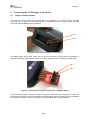
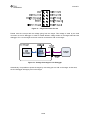
Target Connector Details ......................................................................................................9
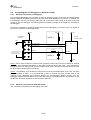
Connecting the CC Debugger to a System on Chip .............................................................11
Minimum connection for debugging ............................................................................................................................ 11
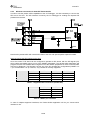
Minimum connection for SmartRF Studio ................................................................................................................... 11
Minimum connection for SmartRF Packet Sniffer ...................................................................................................... 12
Connecting the CC Debugger to a Transceiver (CC2520)....................................................13
Minimum connection for SmartRF Studio ................................................................................................................... 13
Minimum connection for SmartRF Packet Sniffer ...................................................................................................... 13
Using the CC Debugger........................................................................................................14
7.1
8
Understanding the LED .......................................................................................................14
Updating the Firmware.........................................................................................................15
8.1
8.2
8.3
8.4
Updating the firmware automatically in SmartRF Studio.......................................................15
Updating the firmware manually in SmartRF Flash Programmer ..........................................16
Forced boot recovery mode.................................................................................................17
Resurrecting the CC Debugger ...........................................................................................18
9
Troubleshooting ...................................................................................................................20
10
Schematics ...........................................................................................................................21
11
References............................................................................................................................21
12
Document History.................................................................................................................21
2/22