1
3、How to connect Futaba, JR and HITECH transmitters:
HK-X600-F/J/H module can be mounted on the place where the original FUTABA, JR
and HITECH module is located.
USAGE DETAILS:
1)
Turn on the power of the transmitter, set to PPM mode and then turn off the power;
2)
Removed the original module and mount HK-X600-F / J / H module , install the
antenna and tight it;
3)
Set HK-X600-F/J/H 上 SW5 to OFF, and turn on the power of the transmitter,
you can see the LED light blinks, it indicates that HK-X600-F /J/H has already checked
the PPM signal from transmitter.
4、 HOW TO CONNECT A SPEKTRUM TRANSMITTER:
HK-X600-F / J / H module connects SPEKTRUM transmitter through connecting
SPM9545 on SPEKTRUM.
Usage details:
1) Select a SPM9545 that already be bound with SPEKTRUM transmitter;
2) Connect SPM9545 to the port of CON3 on HK-X600-F / J / H according to
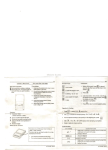
figure 1, fix SPM9545 according to figure 2, Turn the SW5 on HK-X600-F
/J/H to ON;
3) Turn on the power of SPEKTRUM first, and then connect the power to the port
of CON1 on HK-X600-F/J/H;
4) If red LED light on HK-X600-F / J / H blinks, it indicates the connection
between HK-X600-F/J/H and SPEKTRUM is succeed.