1
from the controller and the battery charge indicator will light up confirming that power is switched on and the
Powerchair is ready to move. With the Joystick you control speed and direction of the Powerchair. The more you
move it forward, the faster you travel. To reverse, pull the joystick backwards. While the Powerchair is travelling
forward and backward, moving the joystick left or right steers the Powerchair. Push the joystick full left or right and
the Powerchair will rotate in its smallest turning circle. To slow down, guide the joystick towards its centre (neutral)
position. If you have to stop in an emergency, simply release the joystick. It will automatically return to neutral and
the Powerchair will come to a smooth halt. Once at a standstill the controller will instantly activate the
electromagnetic parking brakes, so that the Powerchair is safely locked while it is stationary.
The Speed Control knob on the rear of
the Controller enables you to reduce the
maximum speed at which the Powerchair
can travel when the joystick is fully
deflected in any direction. The more you
turn this knob anticlockwise, the lower
will be the maximum speed, no matter
how far you push or pull the joystick.
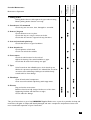
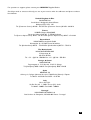
Green
Green
100%
80%
60%
Amber
40%
Amber
Red
Batteries Fully Charged
Fig. 7
The Battery Charge Indicator (Fig. 7) lights up when the ON/OFF button is pressed. It gives updated information as
to how much charge approximately is left in the batteries, so that you can estimate how much further you can
drive before you have to recharge the batteries. The reading will drop while the Powerchair is being driven, and
increase after the Powerchair has been at a standstill for a few seconds. This is quite normal, and it is the best way
to check the charge level while the Powerchair is stationary.
The battery charge indicator also informs you of any fault condition when one or several of the lamps begin to
flash. For details refer to the trouble shooting section.
On the rear face of the controller you will find the Battery Charging Socket. Underneath is a special socket for the
connection of Programming instruments if and when the response characteristics of the Powerchair (acceleration,
deceleration, damping etc.) are to be further adjusted to your needs (Consult your approved INVACARE Supplier
/Dealer/Repairer).
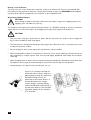
Accessories Including Lap Belt Attachment
NOTE: Ensure the lapbelt is adjusted correctly before using the chair,
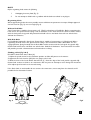
Belt Adjustment
A lapbelt is a standard accessory included with the purchase of your wheelchair, this will have been
factory fitted, or fitted by your Invacare supplier / dealer, who would have provided you with a
demonstration of operation and fitting etc.
The lapbelt is commonly used to assist wheelchair users to maintain an optimal sitting posture. Correct
use of the lapbelt is intended to help the user, especially those with limited sitting balance, to remain safe,
comfortable and well positioned in their wheelchair.
NOTE
In the interests of safety, Invacare recommend the use of a correctly adjusted lapbelt whenever you use
your wheelchair. The lapbelt should be sufficiently tightened to prevent you from sliding down between
the belt and seat.
13