1
airFiber™ User Guide
Chapter 2: Installation
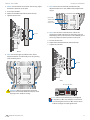
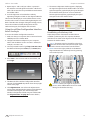
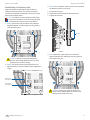
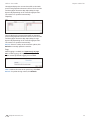
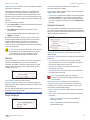
5. Slave Ensure the Azimuth (AZ) and Elevation (EL)
Adjustment Bolts are in the middle of their adjustment
ranges.
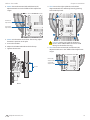
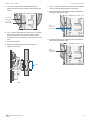
7. Master Adjust the azimuth and elevation of the Master
until you hear the highest pitch for the Master.
a. Sweep the Azimuth (AZ) Adjustment Bolt of the Master
through its adjustment range.
Elevation (EL)
Adjustment Bolt
Azimuth (AZ)
Adjustment Bolt
Master
Azimuth (AZ)
Adjustment Bolt
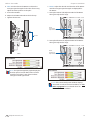
6. Slave Listen to the audio tone of the Slave – the higher
the pitch, the stronger the signal strength. Aim the
Slave at the Master to achieve the strongest signal
strength. If necessary, adjust the Slave’s position on the
pole:
a. Loosen the Hex Nuts.
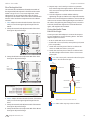
b. Sweep the Elevation (EL) Adjustment Bolt of the Master
through its adjustment range.
b. Adjust the Pole Mount Bracket and Pole Clamps.
c. Tighten the Hex Nuts.
Master
Elevation (EL)
Adjustment Bolt
Hex Nuts
Slave
Ubiquiti Networks, Inc.
18