1
Wellspring Software
PrintBoss View Notes
Settings.
REQUIRED SETTINGS
FILE / PRINTER SETUP
Select the driver matching the Laser Jet printer. The PCL5e is recommended when available. Do not use a Post Script (PS) driver.
DO NOT select the “PrintBoss” printer here. This setting is workstation specific.
EDIT / BANK LIST
PrintBoss comes with 10 bank accounts. If more is needed, a Bank Key disk will need to be purchased. Call Wellspring Software,
Inc., for more information. These settings are only necessary if using the AP-Ck2 specification within Adagio Payables.
Primary Tab:
• Bank Code
•
•
•
•
•
Bank Prompt
Bank Name and Address
Company Name and Address
Next Check Number
Confirm Check Number
Enter the Company ID:MICR field if you want PrintBoss to choose the Bank
Record automatically. Otherwise, enter a name that is meaningful for users.
Enter any word or phrase for user recognition.
Fill in the bank information as it should appear on the checks.
Fill in the company information as it should appear on the checks.
DO NOT fill in. The check number comes from Adagio.
"Auto ..."
MICR Tab:
• Routing Number
• Account Number
• Check Number
Enter the bank account routing number.
Enter the bank account number. Use a period to designate a space.
{CchkNo} or CCCCCC
Miscellaneous Tab:
nd
• 2 Signature Line
• Canadian Style Date/Amount
Check this box if this account should always have a second LINE for signatures.
Check this box if the CPA06 standards should apply to this account.
Signature_Logos Tab
This tab is used if there is a signature or logo based on a PrintBoss Bank record. For these instructions, go to our website
www.wellspringsoftware.com and visit our Support Documents page.
CHECKLIST SETTINGS
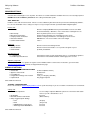
OPTIONS / PRINTBOSS DRIVER SETTINGS
• Transfer File
• Append to Transfer File
• Load PB32.exe
• Configurations Settings Save Location
• Capture Mode
C:\Transfer\{WinUserName}
Do Not Check
Checked
Local_User Registry (Standard)
Flag Trigger Required
Click on OK when finished.
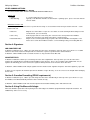
OPTIONS / CONFIGURATIONS
Please visit our website www.wellspringsoftware.com for specific install steps if you are on a Citrix or Terminal Server environment.
Settings Tab
• MICR offset adjustment
• Set Globally
• Work Files Private Folder Names
• Always Trigger/Capture Settings
o Form
o Bank
o PB#INFO flag overrides above
o Allow fragmented PB#INFO line
Use if needing to adjust the MICR line placement. This field is work station
and user specific. Default values are 0.
Checked
{WinUserName}
{ReqList}
(Grayed out)
Checked
Checked
Click on OK when finished.
3