1
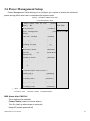
3.6 Power Management Setup
Power Management Setup allows you to configure your system to ensure an enhanced
power-saving effect when user is compliant with system mode.
Phoenix – AwardBIOS CMOS Setup Utility
Power Management Setup
Power Status After AC Fail
Status]
▲
[Former
Item Help
ACPI Function
[Enabled]
[User Menu Level►
Power Management
Define]
Video Off Method
[DPMS]
Video Off In Suspend
[Yes]
Suspend Type
[Stop Grant]
MODEM Use IRQ
[3]
Suspend Mode
[Disabled]
HDD Power Down
[Disabled]
Soft-Off
[Instant-Off]
by
PWR-BTTN
Resume by Alarm
[Disabled]
X Date{Of Month} Alarm
0
X
Time{hh:mm:ss} Alarm
0 : 0
0
:
** Reload Global Timer Events **
Primary IDE 0
[Disabled]
Primary IDE 1
[Disabled]
Secondary IDE 0
[Disabled]
Secondary IDE 0
[Disabled]
FDD,COM,LPT Port
[Disabled]
PCI PIRQ[A-D]#
↑↓→←:Move
Enter:Select +/-/PU/PD:Value
F5: Previous
Values
F6: Fail-Safe
[Disabled]
F10:Save
Defaults
ESC:Exit
F1:General Help
F7: Optimized Defaults
PWR Status After PWR Fail
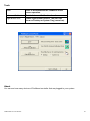
Three options are available:
Former Status (restore to former status)
Turn On (start up when power is restored)
Keep Off (remain powered off)
AHM-6XX7A User Manual
50