1
Model 1191-I Data Collection Platform
User’s Manual
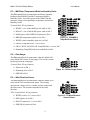
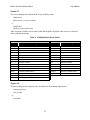
Screens 3–6 will show missing when a broken wire is detected.
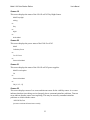
Screen 2
This screen displays the value of the DCP address DIP switch S5 and the status of the maintenance
switch. The maintenance switch will retain its ON value for 5 minutes after being pressed.
Address Switch = {dcp poll address}
Maint Switch {On / Off}
Screen 3
This screen identifies the type of wind speed sensor as configured by S5.
Wind Speed Sensor
{2030 Micro Response, 2100 Skyvane, or 1390 Gill (2040 ultrasonic)}
Screen 4
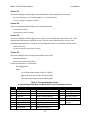
This screen displays the current wind speed in knots, and wind direction values. If the Model
2040 Ultrasonic sensor is used and an error is detected, the error will be displayed in place of
wind data.
Wind Speed {speed in knots to the nearest .1 knot}
Wind Dir {direction} True; or Wind Dir 999 if missing
Screen 5
This screen displays the current temperature and dew point temperature in Celsius and the
relative humidity (RH).
Temp {temperature in degrees Celsius to nearest .1 degree C} RH {rh value}
Dew Point {dew point temperature in degrees Celsius to nearest .1 degree C}
Values are set to 999 if missing.
Screen 6
This screen displays the current temperature and dew point temperature in Fahrenheit and the
relative humidity (RH).
Temp {temperature in degrees Fahrenheit to nearest 0.1 degree F} RH {rh value}
Dew Point {dew point temperature in degrees Fahrenheit to nearest 0.1 degree F}
Values are set to 999 if missing.
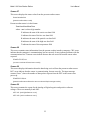
Screen 7
This screen displays the status of the 8190 MARS fan and the system power source.
MARS Fan {OK or FAIL}
System Pwr: {AC or Battery}
If the fan fails, the CDP will stop reporting temperature and dew point.
19