1
UPS Troubleshooting:
NOTE: Troubleshooting procedures may differ depending on UPS model.
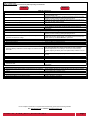
Problem:
Solution:
UPS will not turn on
Press the ON button once to power the UPS and the load.
Check that the power cable from the UPS to the power supply is securely
connected at both ends.
Reduce the load on the UPS by unplugging equipment and reset the circuit
breaker (on back of UPS) by pressing the plunger back in.
Check the AC power supply to the UPS with a table lamp. If the light is very
dim, have the utility voltage checked.
Confirm the battery connections.
• ON button not pushed.
• UPS not connected to AC power supply.
• UPS input circuit breaker tripped.
• Very low or no utility voltage.
• Battery not connected properly.
UPS will not turn off
Do not attempt to use the UPS. Unplug the UPS and have it serviced
immediately.
• Internal UPS fault.
UPS operates on-battery although normal line voltage exists
•
UPS’s input circuit breaker tripped.
•
Very high, low, or distorted line voltage. Inexpensive fuel powered
generators can distort the voltage.
•
Normal UPS operation.
Reduce the load on the UPS by unplugging equipment and reset the circuit
breaker (on back of UPS) by pressing the plunger back in.
Move the UPS to a different outlet on a different circuit. Test the input
voltage with the utility voltage display. If acceptable to the load, reduce the
UPS’s sensitivity. See User’s Manual for procedures.
UPS beeps occasionally
None. The UPS is protecting the load.
UPS does not provide expected backup time
•
The UPS’s battery is weak due to recent outage or is near the end of its
service life.
•
The UPS is overloaded.
•
The UPS has been shut down by remote control.
Charge the battery. Batteries require recharging after extended outages.
Also, they wear faster when put into service often or when operated at
elevated temperatures. If the battery is near the end of its service life,
consider replacing the battery even if the replace battery indicator is not yet
lit.
Check the UPS’s load display. Unplug less needed equipment, such as
printers.
Front panel indicators flash sequentially
None. The UPS will restart automatically when utility power returns.
All indicators are lit and UPS emits a constant beeping
Do not attempt to use the UPS. Turn the UPS off and have it serviced
immediately.
•
Internal UPS fault.
•
The UPS is shut down and the battery is discharged from an extended
outage.
•
•
Weak batteries.
Replacement batteries not connected properly.
All indicators are off and UPS is plugged into wall outlet
None. The UPS will return to normal operation when the power is restored
and the battery has a sufficient charge.
The replace battery light is lit
Do another self-test to see if it clears.
Confirm the battery connections.
For the complete User Manual or comprehensive troubleshooting, please visit the following websites:
APC: http://www.apc.com or coastTec: http://www.coastTec.com
c o a s t T e c _ O T Q G _ S U T 1 _ 2 0 1 3 0 1 0 1 V 0 6 Page 3