1
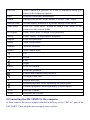
Preview
Select whether a preview of a file is displayed when you
select in the folder navigation
Info
Displays additional information.
Zoom
Enlarges the picture in the modes "Pictures" and "Video".
Interval time
Set the display duration of a picture during a slide show
Slide Show
Press the “slide show” button to start a slide show of the
pictures in the current folder.
DVD play
Press “DVD play” to begin DVD playback
Music
Press ”Music” to begin music playback
Repeat
Press to repeat title.
Menu
View Guide menu.
Subtitle
Activate subtitles.
Audio
Select audio track.
Up
Down
Left
Right
Enter
Press to confirm.
Stops the playback
Pauses and continues the playback.
Go to previous title.
Skip to next title.
Rewind playback. Press repeatedly to select speed.
Forward playback. Press repeatedly to select speed
VOL+
Increase volume.
VOL-
Decrease the volume.
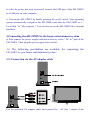
2)Connecting the EH-35MP2 to the computer
a) First connect the power supply included in delivery to the " DC in " port of the
EH-35MP2. Then plug the power supply into a socket.