1
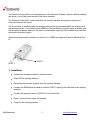
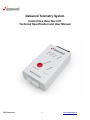
The Datavend Control Box is an integrated part of the Datavend Telemetry System. Before installing
the device, you will also need access to the online software.
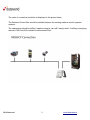
The Datavend Control Box collects data from the vending machine and payment system and
communicates with the server.
The Control Box is installed inside the vending machine and connected between the machine and
the payment system. It is powered by the MDB bus (optional Executive power supply available) and
has an option for battery backup in the event of power down (opening of the machine door can also
disconnect the power supply).
Supported communication interface for version 2.01 is MDB and optional Executive Standard (Prot.
A).
PORT1
PORT 2
1. Installation:
Connect the antenna provided to antenna socket.
Power Off the vending machine.
Disconnect the payment systems from the vending machine.
Connect the MDB extension cable provided to PORT1 and plug the other end to the vending
machine.
Connect the payment system to PORT2 of the Control Box.
Place / secure the box inside the machine.
Power On the vending machine.
2014 Datavend
2
www.datavend.eu