1
x-touchBOX/PANEL
Version 3.0
Table of contents
1 About this user manual .................................................................................................................3
2 Safety .............................................................................................................................................4
3 Design and function ......................................................................................................................5
3.1 DALI – Communication standard ........................................................................................ 6
3.2 Software ›x-touch‹ ............................................................................................................. 6
3.3 Navigation ......................................................................................................................... 8
4 Basic settings ..............................................................................................................................10
4.1 Opening the Configuration menu ...................................................................................... 12
4.2 Selecting the language ..................................................................................................... 12
4.3 Behaviour at net recovery ................................................................................................ 13
4.4 Determining the display name and program version .......................................................... 13
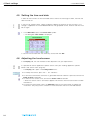
4.5 Setting the time and date ................................................................................................. 14
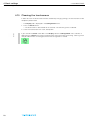
4.6 Adjusting the touchscreen ................................................................................................ 14
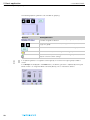
4.7 Setting the frame light and display light ............................................................................ 15
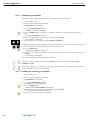
4.8 Assigning names ............................................................................................................. 16
4.9 Password protection ........................................................................................................ 17
4.9.1 Locking the configuration ...............................................................................................17
4.9.2 Locking the panel ...........................................................................................................17
4.10 Cleaning the touchscreen ............................................................................................... 18
5 Basic application .........................................................................................................................19
5.1 Addressing and grouping ................................................................................................. 19
5.1.1 Addressing and grouping operating devices ...................................................................21
5.2 Scene ............................................................................................................................. 22
5.2.1 Configuring scenes .........................................................................................................23
5.3 Sequence ........................................................................................................................ 24
5.3.1 Configuring sequences ...................................................................................................25
5.3.2 Setting the exact starting and fade time of a scene .........................................................26
5.4 Schedule (SDL) ................................................................................................................ 27
5.4.1 Configuring schedules ....................................................................................................28
5.4.2 Loading or checking a schedule .....................................................................................28
5.5 Configuring a schedule list ............................................................................................... 29
6 Colour application .......................................................................................................................30
6.1 Changing the application ................................................................................................. 30
6.2 Addressing and zone assignment ..................................................................................... 30
6.2.1 Addressing RGBW operating devices and assigning them to zones ...............................31
6.3 Configuring colour sequences .......................................................................................... 32
6.4 Configuring colour events ................................................................................................ 33
7 Operation in the Home menu ......................................................................................................34
7.1 Overview ......................................................................................................................... 34
7.2 Creating a layout for the Home menu ............................................................................... 36
7.3 Configuring buttons in the Home menu ............................................................................ 37
7.3.1 Configuring the Scene button .........................................................................................38
7.3.2 Configuring the Dim buttons ...........................................................................................38
7.3.3 Configuring the Colour scene button ..............................................................................39
7.4 Loading application-specific buttons and screen saver ..................................................... 40
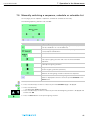
7.5 Manually switching a sequence, schedule or schedule list ................................................. 41
8 Interfaces .....................................................................................................................................42
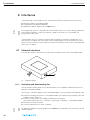
8.1 Infrared interface .............................................................................................................. 42
8.1.1 Uploading and downloading files ....................................................................................42
8.2 Ethernet interface ............................................................................................................ 44
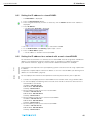
8.2.1 Setting the IP address in x-touchPANEL .........................................................................45
8.2.2 Setting the IP address for a network with several x-touchPANEL ....................................45
1