1
Spyro 3 Manual
9/14/00
4:22 PM
Page 2
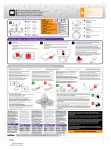
SETTING UP YOUR CONSOLE
Set up your PlayStation® game console according to the instructions in its Instruction
Manual. Make sure the power is OFF before inserting or removing a compact disc. Insert the
Spyro: Year of the Dragon™ disc and close the disc cover. Insert one game controller and
press the POWER button to turn ON the PlayStation game console. Follow the on-screen
instructions to start a game.
CONTROLS
[L2] BUTTON
[R2] BUTTON
[L1] BUTTON
[R1] BUTTON
DIRECTIONAL BUTTONS
ANALOG
MODE SWITCH
Ω BUTTON
≈ BUTTON
ç BUTTON
√ BUTTON
LEFT STICK
SELECT BUTTON
START BUTTON
Note: DUALSHOCK™
analog controller
only: Toggle the
vibration function
ON/OFF by using
the Options mode
Vibration setting.
The Vibration
setting is not
affected by the
controller’s analog
mode switch.
Menu Controls
RESET BUTTON
POWER INDICATOR
MEMORY
CARD SLOT 1
OPEN BUTTON
DISC COVER
CONTROLLER PORT
POWER BUTTON
Start game/Pause/Return to game . . . . . . . . . . . . . . . . . . . . . . . . . . . . . . . . . . . . . . . . . START
Highlight menu selection . . . . . . . . . . . . . . . . . . . . . . . . . ∫, ñ, µ, ≤ or Left Analog Stick
Confirm selection . . . . . . . . . . . . . . . . . . . . . . . . . . . . . . . . . . . . . . . . . . . . . . . . . . . .≈ button
Return to previous . . . . . . . . . . . . . . . . . . . . . . . . . . . . . . . . . . . . . . . . . . . . . . . . . . . ç button
Game Controls
All Playable characters
Memory Cards
To save game setting and progress, insert a MEMORY CARD into MEMORY CARD slot 1 of
your PlayStation game console BEFORE starting play. You can load your saved games from
the same card or from any MEMORY CARD containing previously saved Spyro Year of the
Dragon games. Saving MEMORY CARD data requires one free block. To learn more about how
to save and load games, see "Saving and Loading Game Data" on page 17.
2
Move . . . . . . . . . . . . . . . . . . . . . . . . . . . . . . . . . . . . . . . . . ∫, ñ, µ, ≤ or Left Analog Stick
Hold character in place (while on the ground) . . . . . . . . . . . . . . . . . . . . . . L1 + R1 buttons +
∫, ñ, µ, or ≤ to rotate
Show current levels (Atlas page) . . . . . . . . . . . . . . . . . . . . . . . . . . . . . . . . . . . .SELECT button
3