1
Tek Partner Universal Remote Control
z
z
z
z
Page 3 of 7
TV, VCR, and CBL Device Codes can be searched and locked into "CBL" & "AUX" modes.
Simply press "CBL" or "AUX" Device Mode Button in step 2 and enter an appropriate Magic
Search Code to start searching.
Each time you press the "VOL+" button, the TEK PARTNER™ will skip to the next code. Then
press the "PWR" button to send out a POWER signal trying to turn off your device.
If you failed to stop pressing "VOL+" in time when your device has been turned off, turn on
your device again immediately. Before the indicator goes out, press "VOL-" on the TEK
PARTNER™ to skip backward. Repeat step 4 above and lock in the code.
If the power on/off function of your device is not infra-red controlled, you need to follow steps
1 thru 3 above and start searching: Press "VOL+" and another important function button
alternately until your device responds to the expected function, press the same device mode
button again to lock in the code. e.g. Press "VOL+" & "1 " alternately, or; Press "VOL+" &
"PLAY" alternately until the device responds.
OPERATING THE TEK PARTNER™
NORMAL OPERATION
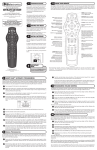
Once you have set up the TEK PARTNER™ for your equipment, it works like your original remote
controls. To operate, just aim it at your equipment, press an appropriate Device Mode Button and
then command the desired function by pressing a corresponding button on the TEK PARTNER™. The
indicator flashes during signal transmission and as confirmation of button touch. At your button
touch, your TEK PARTNER™ illuminates the keypad for 4 seconds. You may see the keypad clearly
even when you are operating your equipment in a dimly lit area.
PUNCH THROUGH
Punch through allows you to operate your TV’s volume and mute functions and your VCR’s 6 tape
management functions without having to switch the device modes repeatedly even when your TEK
PARTNER™ is in other operating modes.
MAINTENANCE
1. Do not expose your TEK PARTNER™ to direct sunlight, high temperature, mechanical shock, or
liquids.
2. Do not use old and new batteries together as old batteries tend to leak.
3. Do not use corrosive or abrasive cleansers on your TEK PARTNER™.
4. Keep the unit dust free by wiping it with a soft, dry cloth.
5. Do not disassemble your TEK PARTNER™, it contains no user-serviceable parts.
TROUBLE SHOOTING
Q. My TEK PARTNER™ does not work at all!
A. If your device’s main switch is turned off, the TEK PARTNER™ can not operate the device.
A. Check whether batteries are in good condition, inserted properly, and are in correct +/- polarity.
See HOW TO INSTALL THE BATTERIES.
A. Make sure you have pressed the Device Mode Button before using any functions.
Q. If several Device Codes are listed for my device, how can I select the correct Device Code?
A. To seek the Device Code for your device, test the codes one by one until the buttons work
properly.
Q. My equipment responds only to some of the commands.
A. You have set a code for which only some commands work properly but some do not. Try other
codes until the buttons work properly.
Q. May I setup the TEK PARTNER™ to control more than one TV, VCR, and CBL at a time?
A. The TEK PARTNER™ can control more than one device of the same type by programming the
device code in the CBL & AUX device modes (i.e. up to 3 TVs). See SETTING UP YOUR TEK
PARTNER™.
SPECIFICATIONS
http://www.hytekmfg.com/manual1.html
3/10/03
Tek Partner Universal Remote Control
z
z
z
z
z
z
Page 4 of 7
Operating System: Pre-programmed infra-red remote control system.
Compatability: Replaces most brands of infra-red remote controls for TVs, VCRs, and CBLs.
Power Requirement: 4 AA size batteries, alkaline recommended.
Effective IR Range: 7.6m (25ft.), +/-25deg.
Alkaline battery operating life: Normal operation - 1 year.
Dimensions: 5-1/2"W x 8-1/2"L x 2-1/2"H
DEVICE CODE LIST
TV Brands
ADMIRAL 400 530
AKAI 160 240 550
AMARK 390 590
CRAIG 170
CURTIS MATHES 030 140 190 300 390 400 530 580
CXC 170
DAEWOO 180 340 380 390
DAYTRON 190 390 580
ELECTROHOME 160 390
EMERSON 020 110 150 170 240 280 330 390 470 590 650
ENVISION 300
FISHER 200 460
FUNAI 020 170
GE 010 040 290 400 420 630
GOLDSTAR 180 190 240 310 390 590
HITACHI 100 260 310 320 390 590
INFINITY 270
JBL 270
JVC 030 250 370
J.C. PENNEY 040 180 190 240 290 300 390 400 440 500 630
KLOSS NOVABEAM 490
KMC 390 590
KTV 170 240 390 590
LLOYTRON 390
LODGENET 530
LOGIK 530
LOGIX 530
LUXMAN 310
LXI 000 190 210
MAGNAVOX 080 120 130 190 270 300 390 450 490 580 590 630
MAJESTIC 530
MARANTZ 160 240 300 450 490
MEMOREX 530
MGA 020 160 180 190 230 240 300 580
MITSUBISHI 020 160 180 190 230 240 580
MITSUBISHI UNIFIED 160
MTC 140 180 300 310
NATIONAL 010 270 420 510 570 610
NEC 180 190 240 300 310 580 620
NEC UNIFIED 300
PANASONIC 010 270 420 510 570
PHILCO 080 120 130 180 240 270 300 390 450 490 540 590
PHILIPS 080 120 130 180 270 300 450 490 540 560 590
PORTLAND 390 590
PROTON 240 390
QUASAR 010 420
RADIO SHACK 070 170 190 390 410
RCA 090 180 240 500 600
http://www.hytekmfg.com/manual1.html
3/10/03