1
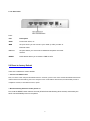
2.1.2. Rear Panel
Ports:
Port
Description
9VAC
Power inlet: AC9V, 1A
WAN
the port where you will connect your cable (or DSL) modem or
Ethernet router.
Port 1-4
the ports where you will connect networked computers and other
devices.
RESET
Reset button allows you to reset the FBR-1418TX.
2.2 Reset to factory Default
There are 2 methods to reset to default.
1. Restore with RESET button
First, turn off the router and press the RESET button in. And then, power on the router and hold the RESET button down
until the Status LED start flashing, then move away the hand. If LED flashes about 8 times, the RESTORE process is
completed. However, if LED flashes 2 times, repeat.
3. Restore directly when the router power on
First, hold the RESET button about 5 seconds (STATUS will start flashing about 5 times). Move away the
hand. The RESTORE process is completed.
6