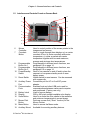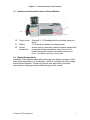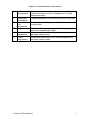
1
IR FlexCam® R2 User Manual
Preface
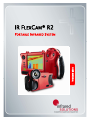
The IR FlexCam® R2 is one of the FlexCam family of handheld portable video
rate infrared cameras which include IR FlexCam® PRO320, T320, T, S, and R1.
The IR FlexCam® cameras are battery (or auxiliary AC) powered; with built-in
image storage via a removable CompactFlash card and varying degrees of onscreen temperature measurements and image analysis. Images can also be
output from the cameras as TV-compatible video for presentation purposes.
The IR FlexCam® R2 has on-camera full screen (19200 pixels) temperature
measurements and image analysis capability. Images saved to the removable
CompactFlash card can be transferred to a PC for documentation and further
analysis.
The IR FlexCam® R2 comes with a Microsoft Windows® compatible PC software
program, SmartView™ that can be used to manipulate images stored on the
CompactFlash card. SmartView™ includes a full suite of functions. Images can
be viewed, analyzed, re-stored elsewhere, printed, and exported in several
commonly used graphic formats and as a numerical data table. The program
also provides the ability to prepare multiple-page custom reports containing the
infrared graphics, an imported visible CCD image, statistical data, annotations
and comments.
Scope
This Manual provides instructions for initial setup, operation and care of the
Infrared Solutions’ IR FlexCam® R2 handheld imaging radiometer. This manual
consists of an introductory section followed by six chapters which describe 1) the
operator interfaces and controls, 2) the camera hardware design features, 3)
camera setup procedures, 4) camera operation, 5) image interpretation and 6) a
discussion on the camera optics. In addition there are four appendices with
useful information on thermography. Although the document presents
troubleshooting tips, it is not a maintenance and repair manual. The theory of
infrared technology is presented, where necessary, to help with target selection
and image capture.
IR FlexCam® R2 User Manual
i