1
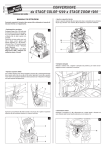
When you remove the lamp replace with a new one of the same
characteristics (Gx9.5 lamp holder).
Then, reinsert, first the pins, the lamp into the socket by pushing.
Make sure the lamp is properly held. Finally, slide the front cover in order
to close it and rotate the rear lid fastener 180º, while pushing it toward the rear
surface of the projector, until you hear a "click" which means that is fixed.
Connect the spotlight and check that the lamp is functioning properly.
5.3. Lens replacement
Firstly, unscrew the front lid screw (see 4 in figure 2) and remove the front
cover of the projector (see 5 in Figure 2).
Inside there are two lenses: the zoom one (in front of the lamp) and the
beam adjustment lens (furthest from the lamp). Adjust the position of the latter
one for making it accessible (see Aperture angle adjustment section).
Unscrew the screws which hold the lens and the metal bracket to the
movable part of the projector. Then the bracket and the lens can be removed.
Replace it and insert the new lens and the support at its original position.
Screw it to the mobile structure of the projector and make sure it is properly
held.
Finally close the upper cover (see 5 in figure 2) and screw it (see 4 in figure
2).
User manual
STR 650-1000 R+PF
13