1
Operation
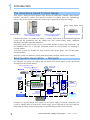
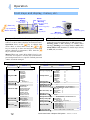
Front Keys and display, menus, etc.
Graphical
Display
Alarm
LED Lamp (red)
16 char. x 2 lines
LCD display
Minipack
rectifier
Warning
LED Lamp (yellow)
Power
”Enter” key
Alarm
LED Lamp (green)
LED Lamp (red)
”Up” arrow key
Power
USB
”Down” arrow key
LED Lamp (green)
0ype B port
Warning
Smartpack control unit
LED Lamp (yellow)
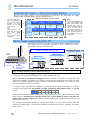
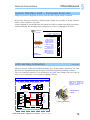
Smartpack Control Unit — front keys, display, etc
Display: is in Status Mode (displays the system’s
status) or in Menu Mode (displays the menu structure).
key to change from
Operation: Press on the
or
Status Mode to Menu Mode. Press the
keys to scroll up or down and navigate to find menu
options (function or parameter). Press then the
key to select the function.
Menus: When you “enter” Menu Mode (Level 1), you
access the User Options. You may also scroll down to
password protected Service Options. Default password
<0003> should be changed.
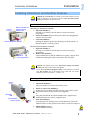
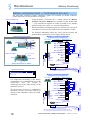
Minipack Rectifier Module — front panel
Power LED is OFF (mains unavailable), Flashing
(controller accessing information) or ON (powered).
Warning LED is ON (derating or similar minor
warning), Flashing (over-voltage mode) or OFF (OK)
Alarm LED is ON (shutdown or similar major alarm)
or OFF (OK, no alarm)
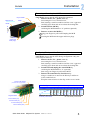
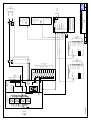
Software Menus ~ Smartpack controller
Level 2
Level 3
User menu <UserOption>
Service menu <ServiceOption>
AlarmResetÆ
Change Language Æ
DisplayMessagesÆ
SoftwareInfoÆ
SerialNumberÆ
Rectifier Info
Mains Info
Temp Level InfoÆ
Battery Info
Firmware 402073.009 2v00 Smartpack, Distributed
VoltageInfo
NomVolt
BoostVolt
LoBattMaj
LoBattMin
HiBattMaj
HiBattMin
LVBD
LVLD 1.1
Message ↓↑
NoOfRects. nn
RectCurrent
RectSerialNumber
Rect.PrimaryVolt
Rectifier Status
Rectifier Temp
Rect. OutputVolt
Rectifier SW Ver
NoOfPhases nn
Mains Status
Mains Voltage
Level ↓↑
NoOfString Nn
BattStringCurr ↓↑
BattStringTemp ↓↑
BattBlockVolt ↓↑
VoltAdjustment
VoltCalibration Æ
ChangePassword Æ
SetManBoostTime Æ
Start/StopBoost Æ
Auto Boost Config. Æ
Batt Test Setup
Start/Stop Test Æ
NoOfRects. ; nn Æ
Charge Curr Lim. Æ
Battery Setup
Output Control Æ
Change Date/Time Æ
RelayTest
BlockOutputs Æ
BattLifeTime Rst Æ
12
English
NomVolt
BoostVolt
LoBattMaj
LoBattMin
HiBattMaj
HiBattMin
LVBD
LVLD 1.1
VoltCal
Password
↓↑
↓↑
↓↑
↓↑
↓↑
↓↑
↓↑
↓↑
↓↑
↓↑
↓↑
2v0
↓↑
Enable/Disable ↓↑ & Threshold ↓↑
Nxt Test DateTime Date ↓↑ Time ↓↑
End Volt
↓↑
MaxTestDur ↓↑
Test Int
↓↑
Guard Time ↓↑
Reset
Enable/Disable ↓↑ & Max C.Curr ↓↑
NumOfString
↓↑
CellCap Ah nn ↓↑
VoltageCtrl / TempComp ↓
Date ↓↑ Time ↓↑
Alarm Output 1 ↑
Alarm Output 2 ↑
Batt Contactor
↑
Load Contactor ↑
Alarm Output nn ↑
Enter OutpBlocked/Exit OutpBlocked
Quick Start Guide Minipack PS System
2v0
356808.103, 1v1-2007-03
The ”XvX” references, if any, on the right hand of the option, are not shown in the display. They only indicate
the firmware version (402073.009 XvX) the option was first implemented.
Level 3
…
Firmware 402073.009 2v00 Smartpack, Distributed
Level 2