1
P R O G R A M M I N G / C O N F I G U R I N G
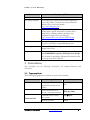
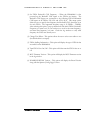
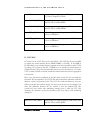
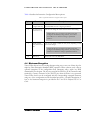
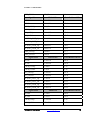
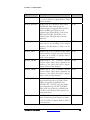
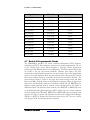
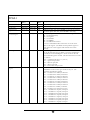
Option
Function
T H E
H A R D W A R E
Description
5
List files on
SmartMedia
This option prints out a list of all the files found on the
SmartMedia card.
6
Display Contents of a
TXT File
This option allows the user to list the contents of any text file on
the Smart Media card.
7
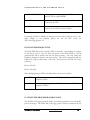
Change RS232 PPC
Ports
This options allows the user to select what FPGA PPCs should
be connected to which PPC PORTS (P3, P4, P6, & P7). This
option will also print out the current port settings allowing you
to quit without changing them.
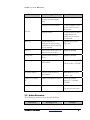
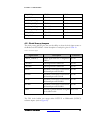
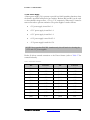
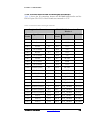
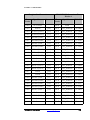
The next 7 options are only available if the FPGAs are configured with The Dini Group
reference design. Please see Appendix A for FPGA Address Maps.
8
Set FPGA Address
Set the fpga address for the next read/write to the fpga.
9
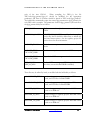
Write to FPGA at
current address
Performs a DWORD write to the current fpga address. You
will see the current address at the top of the Main Menu and also
the write data after selection this option.
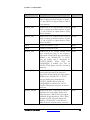
a
Read from FPGA at
current address
Performs a DWORD read at the current FPGA address. You
will see the current address and readback data at the top of the
Main Menu.
b
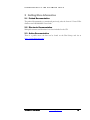
Test FLASH Chip
(through PPC’s)
Allows the user to select which FPGA/FLASH to test. The test
is actually run by the PPC’s and all detailed test messages will
appear on PPC PORT 1 (P3)
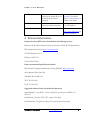
c
Test DDR Chip
(through PPC’s)
Allows the user to select which FPGA/DDR(s) to test. The test
is actually run by the PPC’s and all detailed test messages will
appear on PPC PORT 1 (P3)
DN6000K10 User Guide
www.dinigroup.com
57