1
Pigeon Point Shelf Manager User Guide
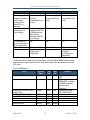
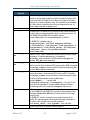
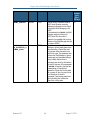
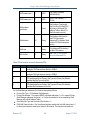
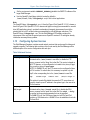
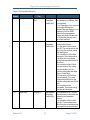
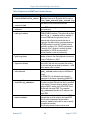
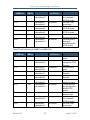
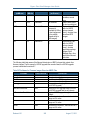
NAME
TYPE
DEFAULT
DESCRIPTION
CAN BE
OBTAINED
FROM
SHELF
FRU INFO
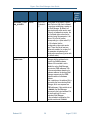
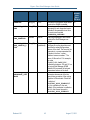
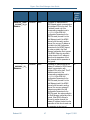
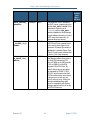
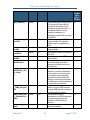
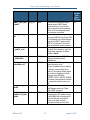
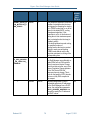
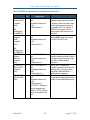
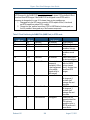
ALLOW_CHANGE
_EVENT_RECEI
VER
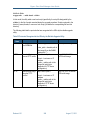
Boolean
TRUE
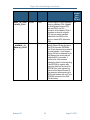
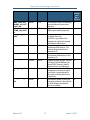
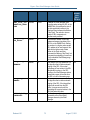
ALLOW_CLEARI
NG_CRITICAL_
ALARM
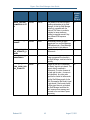
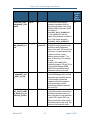
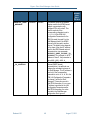
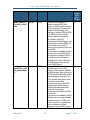
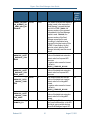
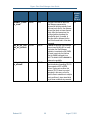
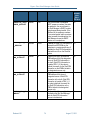
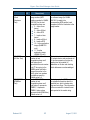
ALLOW_POWER_
UNRELATED_FR
U_IN_CRITICA
L_STATE
Boolean
FALSE
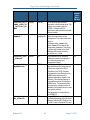
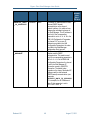
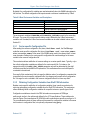
Boolean
FALSE
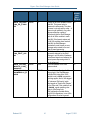
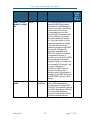
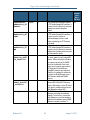
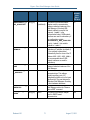
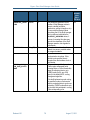
ALLOW_RESET_
STANDALONE
Boolean
FALSE
Release 3.5.1
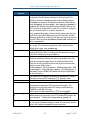
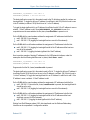
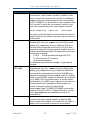
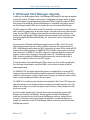
If set to TRUE, the Event receiver
address for the Shelf Manager can be
set to an address other than 20h,
LUN 0. If set to FALSE, any attempt
to change event receiver address for
the Shelf Manager is rejected.
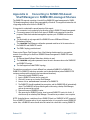
If set to TRUE, the critical alarm
condition can be cleared by the CLI
command clia alarm clear.
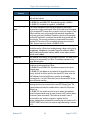
This variable affects the behavior of
the Shelf Manager with respect to
powering up FRUs that are in state
M3 when the shelf is in Critical
thermal alert state. If set to TRUE,
the FRU can be powered on if the
Critical alert state is caused by
temperature sensors that belong to a
different FRU. If set to FALSE, no
FRU can be powered up when the
shelf is in the Critical alert state. In the
case of a Critical alert caused by a
shelf-wide sensor, no FRU can be
powered up, irrespective of the value
of this variable.
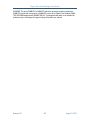
If set to TRUE, the command ―Cold
Reset‖ is accepted even if the Shelf
Manager does not have an available
backup, and reboots the Shelf
Manager. By default, the command
―Cold Reset‖ is accepted only in a
dual redundant configuration and
causes a switchover.
38
Yes
Yes
Yes
Yes
August 17, 2015