1
TS-CV-DC Project Document No./ MP5 No
127.50/FCUL-00009
1.2.1 SET OF THE DISTIRBUTION TEMPERATURE
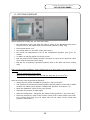
To change the temperature at the distribution line:
•
push the “*” on the temperature regulator
•
wait for the actual temperature set point to be shown keeping the button pushed
•
adjust the set-point by using the flashes (always keeping the “*” button pushed)
•
Release all buttons
PLEASE NOTE THAT THE PARAMETERS OF THE REGULATOR HAVE BEEN SET FOR AN
OPTIMAL USE OF THE COOLING PLANT AT -20°C. IN CASE YOU NEED BIG CHANGES IN
THE DISTRIBUTION TEMPERATURE, PLEASE FORESEE AN INTERVENTION FOR THE
REGULATOR PARAMETER TUNING
1.3 ALARM LIST & ACTIONS
Alarm
Low pressure on fridge unit
Signal generator
Pressure switch
High pressure on fridge unit
Pressure sitch
Low liquid level
Level meter
Regulator alarm
+60°C)
Overheating
(T>
Tset Regulator
High pressure in the tank
Thermostat du chauffage
Pressure switch HP on tank
Vacuum pump : pumping Pressure switch LP on tank
time longer than 10 min
Power failure
PLC
Action
Call for intervention (possible leak into the
fridge circuit)
Call for intervention (possible leak into the
fridge circuit)
Check for liquid leaks, eventually fill the
tank (if during the filling of the circuits)
Call for intervention – leave the plant in
stand-by mode
Call for intervention – leave the plant in
stand-by mode
Re-start the plant in stand-by mode and
verify the tightness
Check for leaks on the return line
Run the start up procedure
Call for intervention: Paola Tropea tel 164999
1.4 STOP PROCEDURE
To stop the cooling unit:
•
Lower down the pump pressure (turn the “output pressure set-point” knob counter
clock wise until it stops and pressure on the “outlet tank pressure” manometer is 0)
•
Change the status in STAND-BY (push the - sign on the PLC)
•
Change the status in STOP (push the - sign on the PLC)
•
Close the distribution valves
4/6