1
4.Device status indicators
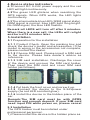
4.1Connect DC 9-24V power supply and the red
LED will light continuously.
4.2The green LED glistens when searching the
GPS signals. When GPS works, the LED lights
continuously.
4.3The intermediate blue LED (GSM signal state)
GSM signal is normal, blue LED light long bright.
No GSM signal, the blue LED flashes.
Remark:all LEDS will turn off after 5 minutes.
When there is a new call, the LEDs will relight
and turn off 5 minutes later.
5.Installation
5.1 Preparation for the installation
5.1.1 Product Check. Open the packing box and
check the device‘s model and accessories. If the
model is wrong or the accessories not complete,
please contact the dealer.
5.1.2 Choose SIM card. Please insert a SIM card
to the device. Please take dealer’s advice as
reference.
5.1.3 SIM card installation. Discharge the cover
of the device and uncover the SIM card holder.
Then insert the SIM card and cover SIM card
holder (as follows).
5.1.4 Put back the front cover and screw it up.
5.1.5 Connect the device to the 9-24Vpower
supply.(he red LED constant glow).
5.1.6 Install the device in the hidden place of the
car.
Remark:The SIM card must be with GPRS
function and enough deposit. If your SIM card
need input PIN when power on, please cancel
5.2 Installation
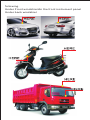
The GPS tracker must be installed under
professional personnel.
1) Please install the device in the hidden place as