1
MicroMainboard
ATX Mainboard
KT3650GLMD
Ultra2-C ATX
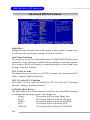
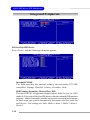
Advanced BIOS Features
Quick Boot
Setting the item to Enabled allows the system to boot within 5 seconds since
it will skip some check items Settings: Disabled, Enabled.
Anti-Virus Protection
The item is to set the Virus Warning feature for IDE Hard Disk boot sector
protection. If the function is enabled and any attempt to write data into this
area is made, BIOS will display a warning message on screen and beep.
Settings: Disabled, Enabled.
CPU L1 & L2 Cache
The item allows you to turn on or off CPU’s internal (L1) and external (L2)
cache. Settings: Enabled, Disabled.
CPU L2 Cache ECC Checking
This field is used to enable or disable the CPU L2 Cache ECC Checking
function. Settings: Enabled, Disabled.
1st/2nd/3rd Boot Device
The items allow you to set the sequence of boot devices where BIOS attempts
to load the disk operating system. The settings are:
Floppy
The system will boot from floppy drive.
LS120
The system will boot from LS-120 drive.
HDD-0
The system will boot from the first HDD.
SCSI
The system will boot from the SCSI.
CDROM
The system will boot from the CD-ROM.
3-8