1
TR515 User’s Manual
1. Installing the TR515
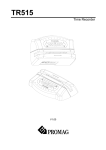
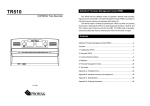
OUT button & LED
IN button & LED
Bell Control
DC Jack Comm. Status
Comm. Port
Magnetic/ barcode
head on this side
Wall-mount and desktop operation
The TR515 can be used either as a wall-mount (default, see Figure above) or desktop device.
Machine needs to be rotated 180 degrees when used on a desk. For this reason, the TR515
comes with two different LED plates (with their artworks rotated 180 degrees with respect to each
other). Machine’s LED can also display time and other data in a “normal” (wall-mount), or desktop
fashion. There is an orientation setting provided that allows you to select display mode (see
Section 4).
1. RS-232/485 Interface Versions
The TR515 supports two different interfaces: RS232 for single-terminal communications, and
RS485 for multi-terminal communications. Only one TR515 can be attached to the PC’s serial port
using the RS232 interface. Up to 32 units can be interconnected using the multi-terminal RS485
communications.
RS232 arrangement is simple: just plug the RS232 cable (supplied) into the TR515 and
connect the other side to the PC’s serial port.
Using RS485 requires a special adaptor- CON485 (must be purchased separately). CON485
is a “smart” RS232Æ RS485 converter that allows for higher data transfer rates between the PC
and TR515s.
The RS485 network is of “bus” type- all TR515s are connected in parallel on a so-called
twisted pair bus. The most suitable cable for the bus is the one normally used for Ethernet
1