1
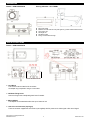
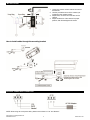
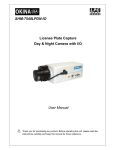
PACKAGE CONTENTS One (1) SHM-7540LPDN-IO/SHM-7540LPDN-IOP Camera One (1) HI11-TKHBL IR Illuminator Housing One (1) Fully-Cable Managed Bracket One (1) Main Accessories Pack Three (3) Rust-proof Stainless Steel Wall Screws Three (3) Rust-proof Stainless Steel Mounting Screws Three (3) Stainless Steel Washers Three (3) Plastic Washers One (1) Allen Wrench One (1) Secondary Accessories Pack Three (3) Screw-on Connectors One (1) Rubber Pad One (1) Rust-proof Stainless Steel Camera Screw One (1) Plastic Washer One (1) Operational Manual * For any returns, please include all components listed above with original packaging in Resalable Condition. Absolutely No Returns will be accepted if any component is missing/damaged or if any cable is cut or tampered with. CAUTIONS 1. Never point the camera toward the sun Do not expose the lens directly to the sun or to strong light as this may damage the pick-up device. 2. Handle this camera with care Avoid any shock or bumping of the camera. Improper handling could damage the camera. 3. Requires a proper operating environment This camera is designed for outdoor or indoor use. The allowable temperature range for operation of this camera is between 14F ~ 122F / -10C ~ 50C and the allowable humidity is 80%RH maximum. 4. Clean the front face to the pick-up device It is recommended that the pick-up device surface be cleaned before lens installation or whenever the lens is changed. Cleaning should be done by using a chamois, a very fine soft cloth, lens tissue, or cotton tipped applicator and ethanol to carefully remove any fingerprint or dust. 5. Check the power source voltage The power source voltage should be within the specified range. (Camera must meet the specifications). Camera must be connected to a surge protector at all times. 6. Objects and liquid entry Never push objects of any kind into this camera as this may touch dangerous voltage points of short out parts that could result in a fire or electric shock. Never spill any kind of liquid on the video product. 7. Servicing Do not attempt to service this video product by yourself as opening or removing covers may expose you to dangerous voltage or other hazards. Refer all service to qualified servicing personnel. 8. Damage requiring service Unplug this video product from the wall outlet and refer service to qualified servicing personnel under the following conditions: a. When the power supply cord or plug is damaged. b. If liquid has been spilled, or objects have fallen into the video product. c. If the video product has been dropped or the cabinet has been damaged. d. When the video product exhibits a distinct change in performance. WARRANTY OKINA USA Products are covered under warranty for one year from the date of purchase. The warranty will automatically be voided if any of the following occurs: 1. Product sticker is removed If the product sticker is removed, we will not be able to confirm any information regarding when and where the product was purchased. We have no other way to verify the purchase record without the serial number on the product sticker; therefore, it should not be removed. 2. Product is modified in any way If the product is scratched, damaged, or modified in a manner not described in this manual, the warranty will be voided immediately. It is the customer’s responsibility to keep the product in good condition. 3. Power cable is cut The power cable and any other cable should not be tampered with. Cutting or modifying of the cables will result in termination of the warranty. Copyright 2010. All Rights Reserved. www.okinausa.com 7 REV012011-V03