1
Table of Contents
Chapter 1.
1.1
Introduction .............................................................................. 3
Hardware Description................................................................................... 4
1.1.1
Video wall decoder Series ................................................................ 4
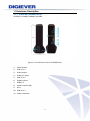
Figure 1. Front & Rear View of VD-0000 Series............................................... 4
1.2
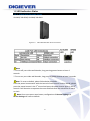
LED Indicators Status ..................................................................................... 5
1.2.1
1.3
Video Wall Decoder Series ............................................................... 5
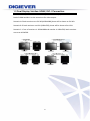
Dual Display Solution: HDMI/ DVI-I Connection ...................................... 6
Chapter 2.
Decoder Installation ................................................................. 7
2.1
Remote Browser PC System Requirements ............................................... 7
2.2
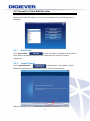
Connect to Video Wall Decoder ................................................................ 8
2.2.1
Quick Guide ....................................................................................... 8
2.2.2
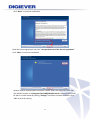
Install EZ Search................................................................................ 8
2.2.3
User Manual ..................................................................................... 16
2.2.4
Browse CD ....................................................................................... 16
2.3
Quick Configuration ................................................................................... 18
2.3.1
Start .................................................................................................. 18
2.3.2
Network Settings ............................................................................. 19
2.3.3
Server Settings ................................................................................ 20
2.3.4
Date &Time ....................................................................................... 21
2.3.5
Camera Settings .............................................................................. 23
2.3.6
Finish ................................................................................................ 33
Chapter 3.
3.1
Use Video Wall Decoder by Local Display ........................... 35
Log in Decoder ............................................................................................ 35
1.1.1
Anonymous login ............................................................................ 36
1.1.2
Virtual Keyboard .............................................................................. 37
3.2
Liveview ........................................................................................................ 38
3.2.1
Select View Modes on Liveview Page ........................................... 38
3.2.2
Main Functions for Live View ......................................................... 39
i