1
1.6 System installation
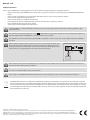
The system box should be fixed with four screws to the wall. Since the ESIM021 has integrated GSM antenna, it should not be
installed into the metal box. For the connection of power supply, output and inputs connectors should be used 1 thread 0,5mm2
cable. Cables should be connected to the connectors and brought through the special cover hole for cables.
1.
2.
3.
4.
5.
Enter one or two numbers into SIM card under names “User1” and “User2”.
Place SIM card in the holder but make sure that SIM card PIN code request is disabled (PIN code can be disabled by putting SIM
card into mobile phone and following proper menus). SIM card should not have any remaining SMS messages.
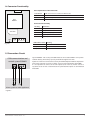
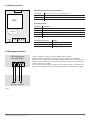
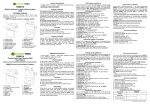
Connect the circuit as shown in Fig. No.2. Power supply cables are connected last. When connecting ESIM021 to security central system power supply, usually the security system AUX output is used. Security system power supply must be disconnected
before connecting ESIM021.
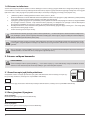
When DC power supply (ground transformer) is used connect according to circuit no. 3. there is no need to connect any other
power supplies.
The system will start in less than a minute.
To increase system reliability, it is recommended not to use prepaid SIM cards. The system would fail to send any messages upon depletion of prepaid account. Also it is recommended to disable call forwarding and voice mail.
It is worth to choose the same GSM cellular provider as most users use assuring fast and reliable SMS message delivery
and phone call connection.
Even though alarm system ESIM021 installation is not complicated, it is recommended to be performed by a person
with basic knowledge in electrical engineering and electronics to avoid any system damage.
2. System control commands
VERY IMPORTANT!!!
Underscore symbol ‘_’ in this manual is used to represent space. When writing SMS messages, every underscore symbol
should be replaced by single space symbol. Don’t leave any space at the beginning and the end of the message.
2.1 Change the way system informs about events
By default the system is set to inform users about events via SMS message. To set system to inform users via calls, user have to send
SMS message to Esim021:
CALL
ESIM 021
To change back the system to inform users via SMS, user have to send SMS message to Esim021:
SMS
2.2 Enabling/disabling zones
Enabling Zone
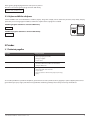
Any zone can be enabled by sending the following SMS message:
ZONE1:ON or ZONE2:ON
Disabling Zone
Any zone can be disabled by sending the following SMS message:
ZONE1:OFF or ZONE2:OFF
6
CALL