1
2
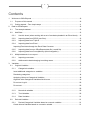
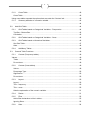
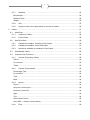
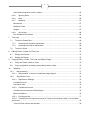
Contents
1.
2.
Welcome to OfficeReports ..................................................................................................... 10
1.1.
Purpose of this manual ................................................................................................... 10
1.2.
Getting started – Four simple steps ................................................................................ 11
Data in OfficeReports............................................................................................................. 12
2.1.
The example dataset ...................................................................................................... 12
2.2.
Add Data......................................................................................................................... 13
2.2.1.
Use this sheet (when working with a set of raw data uploaded in an Excel sheet) ... 13
2.2.2.
Importing data from SPSS (.sav files) ...................................................................... 13
2.2.3.
Importing data from Triple-S .................................................................................... 13
2.2.4.
Importing data from Excel ........................................................................................ 14
Importing Excel data through the Excel Data Converter ..................................................... 14
2.2.5.
Importing data from an OfficeReports data file (.accdb file) ...................................... 14
2.2.6.
Importing data from SurveyMonkey (direct integration) ............................................ 14
2.3.
3.
Multiple datasets in one report ........................................................................................ 15
2.3.1.
Importing new cases ................................................................................................ 15
2.3.2.
Add/overwrite data belonging to existing cases........................................................ 15
Variables ................................................................................................................................ 16
3.1.
Original Variables ........................................................................................................... 17
3.1.1.
Categorical variables ............................................................................................... 17
Insert additional categories to variables .............................................................................. 17
Reordering categories ........................................................................................................ 18
Assigning Values to Categorical Variables ......................................................................... 18
Organize other Categorical Variables like this one ............................................................. 19
Do not sort in grid ............................................................................................................... 20
Do not sort.......................................................................................................................... 20
........................................................................................................................................... 20
3.1.2.
Numerical variables ................................................................................................. 20
3.1.3.
Text Variables .......................................................................................................... 20
3.1.4.
Date Variables ......................................................................................................... 21
3.2.
Derived Variables ........................................................................................................... 21
3.2.1.
Derived Categorical Variables based on numeric variables ..................................... 21
Create Interval Variable based on a numeric variable ........................................................ 21