1
Setting
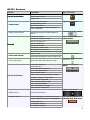
Description
Default
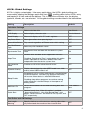
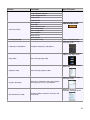
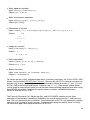
{} <-> [] Conversion
Specify whether to convert curly braces to square
brackets when importing/exporting and editing/viewing
text files with I41CXED. Enabling this option provides
seamless compatibility between the i41CX+ CAS and
REDUCE.
OFF
Access Saved Files
If enabled, I41CXED and CAS will look for the specified
file in the saved text files directory of your device (i.e. the
items that show up in the Load Data picker) if the
specified file is not found in extended memory. This is
useful if you wish to create a CAS input file that won't fit
in extended memory and to view CAS output in a saved
text file.
OFF
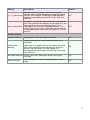
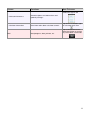
Specify power state when app is launched
OFF
Printer Settings
Power At Launch
Display warning when recommended printout size is
exceeded.
Printout Size
Warning
While there is no explicit limit for the number of printed
lines, each printed line consumes memory and if you
plan to save the printout as a JPEG photo, we
recommend that the number of lines be not much more
than 200 lines.
ON
Start With New Roll
Printer starts with a new paper roll each time app is
launched
OFF
Volume Control
Volume of printer sounds is controlled by the volume
slider.
OFF
3