1
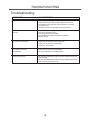
TROUBLESHOOTING
Troubleshooting
PROBLEM
CAUSE/REMEDY
No power when unit is turned on.
- Switch on the electric current at the socket.
- Check that the plug has been correctly inserted into the socket.
- The internal fuse has blown and must be replaced by a qualified
service technician.
- The power cord has been damaged and must be replaced.
No sound.
- The unit has not been turned on.
- Incorrect connection to the amplifier.
- No loudspeakers have been connected to the amplifier.
- No CD in the unit.
The unit will not read the disc.
- Check if the disc has been turned upside down.
- Check if the disc is clean and undamaged.
- Check if it is a CD or a CD-r.
The unit skips some parts
during playback.
- Check if the disc is clean and undamaged.
- The unit is positioned on an unstable surface.
A buzzing can be heard.
-The RCA cables between the CDP-200 and the amplifier/receiver have
been damaged.
-The RCA cables between the CDP-200 and the amplifier/receiver have
been wound around the power cord.
18