1
2.3 PHP
PHP is a server-side scripting language designed for
web development, in which case PHP generally runs on a
web server (e.g. Apache, Nginx, etc.)
PHP code can be mixed with HTML code to construct a
dynamic webpage. It is usually processed by a PHP
interpreter, which is often implemented on the web server
side by a server native module or a Common Gateway
Interface (CGI) executable. After the PHP code is
interpreted and executed, the web server sends the resulting
output to its client, usually in form of a part of the generated
web page; for example, PHP code can generate a web page's
HTML code, an image, or some other data [5].
www.a.com. This policy demonstrates a huge restriction on
what we want to achieve, which is to send requests to any
domain. And, it is impractical for us to ask web
administrators to grant our application access to their web
servers. Therefore, we opt not to use Flash.
2.5 Adobe AIR
Adobe AIR supports the full Adobe Flash API so that
it gains all the advantages of Flash. In addition, AIR provides
an API named flash.net.dns for DNS queries and other APIs
supporting file system integration and access to connected
devices. The AIR runtime supports installable applications
on Windows, OS X and mobile operating systems like
Android, iOS and BlackBerry Tablet OS [10].
According to the fact that PHP is a server-side scripting
language and can only be executed on the server side, this
makes us have to execute our program remotely. Therefore,
servers instead of browsers will send the DNS/HTTP
requests that we embed in PHP programs. Results will reflect
the accessibility in servers’ perspective instead of users
which is not what we intend to measure.
Another advantage of Adobe AIR is allowing Adobe
Flash and ActionScript code to construct applications that
run outside of a web browser, and behaves like a native
application on supported platforms [10].
Alternatively we can achieve our goal by deploying
LAMP-like environment in client-side (e.g. LAMP [6],
MAMP [7], WAMP [8]) where to let PHP scripts execute on,
but this approach breaches our principle that do not install
heavy packages and complex configurations on the client
side.
According to the investigations on HTML5, JavaScript,
PHP, Flash and AIR technologies, we find that AIR is a
suitable platform for our application because AIR does not
have the cross-domain restriction and also provides APIs
accessing low level streams. Therefore, we decide to
implement ICFlash using AIR.
As a consequence, PHP is not an ideal method for this
project.
The most important point is that AIR does not have the
cross-domain restriction. Consequently it allows us to send
HTTP requests to arbitrary servers [10].
3. DESIGN
2.4 Adobe Flash
Adobe Flash is a common user-side presentation
platform in modern web applications. Its common usage
includes video player, animation, website navigation, and
complex application (such as image editor). It supports
cross-platforms running on Windows, Mac OS, and Linux.
It not only has a wide number of platform supports, but also
gains a huge user base.
Flash application is written in ActionScript with various
front-end technologies. The source code is compiled into a
Shockwave Flash file (i.e. SWF file).
SWF files can be embedded in web pages, and they must
be running on a system with Adobe Flash installed.
Flash provides certain APIs that do not exist in
browsers. These APIs include TCP streams and custom TCP
requests, which are crucial to our application
implementation.
However, Flash enforces certain security policies. One
of such is the cross-domain policy [9]. The target server
which the Flash application tries to access, must grant
permission to the domain where the Flash application
resides, by including a “crossdomain.xml” file on its own
server. For example, if a Flash application on www.a.com
wants to access www.b.com, www.b.com must include
“crossdomain.xml” on its root that grants permission to
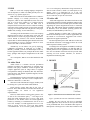
Figure 1. Interaction between ICFlash and other systems
Figure 1 presents an overview of ICFlash’s workflow.
Initially, the user visits our web server to download
ICFlash application. Next, the user can use a specified URL
or our predefined URL list to send HTTP GET requests or
DNS queries to the target server. After that, ICFlash records
2