1
0 I
A2
A3
A4
M1
M2
Conf
1
0/R
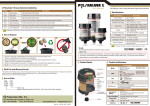
HOW TO USE
1. Insert filter laminate into sampling head.
2.PUSH to I to connect POWER
3.Check different display readings by PUSHING .
- you can see how signal lights change A1, A2, A3, A4.
4.RESET panel meter memory by PUSHING RESET.
- you can see that values in A3 ( Total volume ) and
A4 ( Total time ) has changed to 00.00.00.
5.TURN FLOW CONTROL CW and stop turning when you
have got desired flow rate, see A2.
6.When you have collected your sample, depending whether
on desired volume, m3 or desired time, hours/minutes
- TURN potentiometer CCW all the way to the left.
Pump stops and also your panel meter stops.
Panel meter starts calculations when Pascal value is higher than
50Pa and it pauses calculations when value is lower than 50Pa.
13.10.88
A1
5.PANEL METER display
A1, Pressure difference,Pascal
A2, Volume flow,m3/h
A3, Total volume,m3
A4, Total time,hh:mm:ss
3.CHARGE CONNECTOR
- When batteries are empty,
charge
4.STOP / FLOW CONTROL
- Changes pump speed
1.POWER
- Connects batteries to unit
2.RESET
- Resets panel meter memory
1
3
2
4
BATTERY INDICATOR
Battery fully charged
Battery half charged
Battery is empty
3
If battery goes empty
during sampling, the
pump will automatically
stop.
To RESET this you have
to turn FLOW CONTROL
to 0/R.
2