1
4 – INSTALLATION
CONNECTION TO A
PRINTER
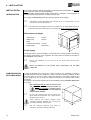
To get a control with the most significant data, a standard needle (i.e. IBM Proprinter or
Epson 70) or thermal printer equipped with Centronics parallel interface can be connected
to the sterilizer printer port.
This strip can be filed as tracability report of the carried out sterilization process.
e
IN CASE OF THERMAL PRINTER, STORE THE STRIP IN PLACE ADEQUATE FOR PROTECTING IT
FROM LIGHT AND/OR HEAT SOURCES.
Connect the printer to the sterilizer port through a parallel cable (maximum length = 2m),
provided one side with DB 25 male connector (sterilizer side).
For setting the printer and choice the report characteristics refer to Chapter “Setting the
equipment”.
e
ACQUIRING THE
ENVIRONMENT
PRESSURE VALUE
THE EQUIPMENT IS ABLE TO MANAGE ALSO LASER OR INKJET PRINTERS. HOWEVER THESE
TYPES OF PRINTERS REQUIRE AT THE END OF EACH PRINTED PAGE A FORM FEED (FF)
INSTEAD OF LINE FEED (LF) COMMAND THAT IS NOT MANAGED BY THE STERILIZER. TO GET
THE PRINTOUT WILL BE THEREFORE NECESSARY TO ENABLE THE FORM-FEED KEY
NORMALLY PROVIDED ON THE PRINTER.
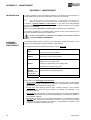
For the correct operation of internal auxiliary systems, it is necessary that the sterilizer
acquires the environment pressure value of the installation site before starting the first
operation cycle.
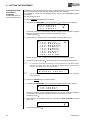
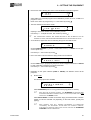
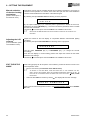
The procedure is described in the Chapter “Setting the equipment” (see paragraph Option
selection in the SETUP program).
Please read carefully the indications supplied.
e
THE EQUIPMENT LEAVES THE FACTORY WITH THE PRESSURE VALUE RELATING THE
PRODUCTION ENVIRONMENT STORED INTO THE MEMORY.
IF
THE PRESSURE ACQUISITION PROCEDURE IS NOT PERFORMED, THE EQUIPMENT WOULD
NOT CORRECTLY WORK, WITH DIFFICULT OR IMPOSSIBLE DOOR OPENING AT THE END OF
THE PROGRAM .
Extrema Plus
15