1
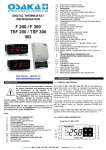
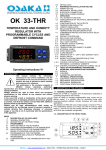
1 - Key “SET”: Pressing and releasing, programming control value In some cases, this password is very useful so that no improper
handling in, if you want to change the password once entered the
(Set point). Keeping for 5 seconds, the setup menu entry.
desired number and password in the "t, PP" parameter, Exit
2 - DOWN Key: Pressing directly without entering the menu, serves programming.
to decrease the value of the SET POINT. On the menu parameters When the password is programmed, pressing "Set" for 5 seconds
used to search the desired parameter and after pressing the to enter the settings menu, the computer displays the acronym 'rP"
selection parameter "SET" serves to diminish or select the new and pressing "Set" show "O", then we select the buttons "up" or
value of the parameter.
"down" the value of correct password code and press "set" to
proceed to access the programming parameters.
3 - UP / DEFROST Key: Holding down for 5 seconds to start a If the password is correct, the display will show the code of the first
manual defrost (if the conditions of end defrost probe has no value parameter. The password protection can be disabled with the
beyond the end of defrost).
"t.PP" = oF parameter.
In the parameter menu is used to find the desired parameter and
after pressing the selection parameter "SET" serves to increase or Note: If lost the password to access the parameters, use the
select the new value of the parameter.
following procedure:
Turn off electrical power to the computer and re-feeding while you
4 - Key
/ "F": It is possible to perform 3 functions:
press the "SET" button for 5 seconds. Access parameters will be
a) Shows the value of the evaporator probe, or the third probe (in taken and you could modify the "t.PP" parameter.
the case of being programmed).
b) Pressing for 1 second can power cycle the device (ON / OFF), 2.4 CUSTOMIZING SETTINGS
programming the "UF" parameter.
The password protects with just a few other parameters without
c) Exit Parameter Programming
password in order to let the user access to the parameters
required, while access to all parameters that are specific technical
5 - Led SET: Indication shown in the programming mode the set or machine manufacturer.
point. In the parameter menu, indicates the level of programming Method to select the level of programming parameters:
said parameter.
Access programming through password and select the parameter
to be programmed without password. If the SET LED flashes
6 - Led OUT COOL: Indicates the status of the control output means that the parameter is programmable only with the password,
(compressor or control device temperature, solenoid actuator, etc..) or protected, and if the LED is fixed indicates that the parameter is
This output is active (lit) and off (off) and disabled signal (flashing). direct access without password.
To change the level of visibility of the parameter press together "Up
7 - Led OUT HEAT: Identical to "Led OUT COOL", but for the heat + Set" keys.
function.
The SET LED will change state in indicating the new access level
parameter (protected, flashing LED) and (direct access without
8 - Led DEF: Indicates the current status of defrost, Pilot flashing password, fixed LED).
Upon entering the first parameter menu visualize user level
indicates defrosting is being done.
parameters (unprotected) and then (protected) by entering the
9 - Led ALARM: Indicates the status of the alarm. ON (lit) OFF password if the device shows "rP"
(stopped) or Ongoing (intermittent)
10 - Led Stand-By: Indicates he's Stand-By
(Press Key
or "F" for 3 seconds to activate or digital input).
2 - PROGRAMMING
2.1 - MODIFICATION OF SET POINT
Press the "SET" key and release, the display will show "SP"
alternating control value.
To change the value, press "up" to increase value and "down" to
descend.
If "Up or Down" key is held quickly increase speed to help select a
distant value.
After selecting the desired value is confirmed by pressing "SET" or
self confirm whether any last key pressed 10 seconds, turning the
thermostat to normal operation.
2.2 - PROGRAMMING PARAMETERS
If the Password parameter access is not enabled (default setting),
press "SET" for 5 sec., The display will show the code that
identifies the first parameter and the "Up" or "Down" button you 2.5 – RESTORATION INITIAL PARAMETERS
can select the desired parameter.
The device has a parameter reset, restoring the program to Factory
Settings.
After selecting the desired parameter, press the "SET" key and the To enter this Reset "rP" the password value to “- 48“
value will be programmed to the desired parameter. This setting The display will show "---" and the instrument will reset.
can be changed by pressing the "Up" or "Down" to the desired
value. Press "SET" to confirm and store the value.
2.6 - KEY LOCK FUNCTION
Returning to the "Up" or "Down" keys again be possible to select It is possible to completely lock the keys. Such a function is useful
another parameter and modify it on.
when the control is accessible to the public and you want to prevent
To exit the programming mode: do not touch any key for 10 tampering. The key lock function is activated by setting the "t.Lo"
seconds or press the or "F" key for 2 sec.
parameter to a value of OF.
The value set in par. "T.Lo" is the time that the thermostat allows
2.3 - PASSWORD PROTECTION PARAMETERS
access to the keyboard and after passing this time the thermostat
The instrument has a parameter protection function with is locked.
configurable password code in the "t, PP" parameter.
OSAKA - F 100 / TSF 100 / M1 - Manual de Usuario – V2 - PAG. 2