1
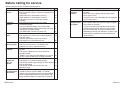
Before calling for service
Before calling for service, check the following points.
60-ENGLISH
Page
–
–
54
55
–
–
27
45
31
27
21
Problem
Possible cause
Page
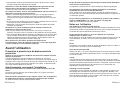
The picture does B The signal format (“TV-SYSTEM”) may not be set 49
not display
correctly.
correctly.
–
B There may be a problem with the video tape or
other signal source.
B A signal which is not compatible with the projector 65
may be being input.
Picture from
B The cable may be too long.
–
computer does B The external video output for the laptop computer 67
not appear.
may not be set correctly.
(You may be able to change the external output
settings by pressing the [Fn]+[F3] or [Fn]+[F10]
keys simultaneously. The actual method varies
depending on the type of computer, so refer to the
documentation provided with your computer for
further details.)
–
20
45
–
–
31
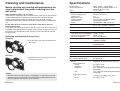
Care and maintenance
Problem
Possible cause
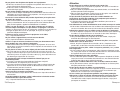
Power does not B The power cord may not be connected.
turn on.
B The main power supply is not being supplied to the
wall outlet.
B TEMP indicator is illuminated or flashing.
B LAMP indicator is illuminated or flashing.
B The lamp unit cover has not been securely
installed.
No picture
B The video signal input source may not be
appears.
connected properly.
B The input selection setting may not be correct.
B The “BRIGHTNESS” adjustment setting may be at
the minimum possible setting.
B The “SHUTTER” function may be in use.
The picture is B The lens focus may not have been set correctly.
fuzzy.
B The projector may not be at the correct distance
from the screen.
B The lens and the lens cover may be dirty.
B The projector may be tilted too much.
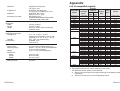
The color is
B “COLOR ADJUSTMENT” settings may be incorrect.
pale or grayish. B The input source which is connected to the
projector may not be adjusted correctly.
No sound can B The audio signal source may not be connected
be heard.
properly.
B The volume adjustment may be at the lowest
possible setting.
B “AUDIO” in the “SD PICTURE SETUP” may be set
to “OFF” while the SD signal is being projected.
The remote
B The battery may be weak.
control unit
B The battery may not be inserted correctly.
does not
B The remote control signal receptor on the projector
operate.
may be obstructed.
B The remote control unit may be out of the
operation range.
The buttons on B The “CTRL PANEL” may be set to “INVALID”.
the projector do
In order to set the “CTRL PANEL” to “VALID”
not function.
without using the remote control unit, keep holding
down the SD ENTER button on the projector and
press the INPUT button for more than 2 seconds.
39
–
24
24
24
50
ENGLISH-61