1
Presentations
6.6
68
Presenting with Collaboration
Qwizdom Actionpoint software includes 5 Qwizdom Notes+ licenses that allow for
classroom collaboration. (Additional licenses are available for a fee--email
info@qwizdom.com for pricing.)
Participants can view live lessons, respond, share annotations, take notes, and save
presentations for review, using any tablet or laptop on the same local network as the
presenter.
Start Presentation
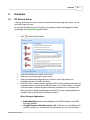
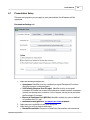
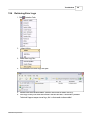
1. Select a PowerPoint®/Actionpoint presentation and click Start Presentation.
2. Select the Device Settings tab in Presentation Setup.
3. Check box to Enable local network communication.
(Local communication allows users to connect to the session by IP address. All users must
be on the same network as the presenter.)
4. Click OK to start the presentation.
Qwizdom Actionpoint 2015