1
One-Way Translation
1. The SQU.ID® SQ.200 is a phrase based, one-way translator. This means that it
plays pre-recorded phrases in target languages to help you communicate with
people who do not speak English. IT IS IMPORTANT TO KNOW THAT THE SQ.200
WILL NOT TRANSLATE A TARGET LANGUAGE BACK INTO ENGLISH.
2. Phrases are predefined by industry experts then translated by fluent interpreters,
organized and thoroughly vetted to ensure that you are getting the most accurate
translation possible.
Translations/Commands with the Voice User
Interface (VUI)
PUSH TO TALK Mode (Eyes Free)
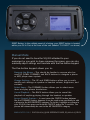
PUSH TO TALK Mode for eyes free translation is useful when you have a
free hand to tap or press and release the PUSH TO TALK button. Using
the PUSH TO TALK button is the fail-safe method for ensuring that the
SQ.200 is listening for a phrase or command.
Translations
1. To translate a phrase in this mode, simply tap the PUSH TO TALK button located on
the front of the SQ.200.
2. You should hear a single ‘ping’ in the earpiece. This ‘ping’ indicates that the SQ.200
is waiting for you to speak one of the pre-recorded phrases.
3. Say the pre-recorded phrase you wish to translate. NOTE: BE SURE THE PHRASE IS
WITHIN THE ALWAYS ACTIVE> OR SELECTED CATEGORY.
4. There will be a short pause followed by the English verification of the phrase in
your headset earpiece.
5. The SQ.200 will then broadcast the phrase in the target language you have chosen.
Commands
1. To initiate commands in the PUSH TO TALK Mode, simply press the PUSH TO TALK button
as if you were translating, except hold it down for about a second, then release it.
2. You will hear two pings, the second with a higher pitch (‘ping-PING’). This indicates
that the SQ.200 is waiting for a command rather than a translation.
3. In a normal clear voice, say one of the designated commands into the headset
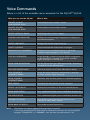
microphone. For a complete listing of SQ.200 commands, refer to the “Voice
Commands” chart on this guide.
4. The SQ.200 will immediately perform your command while playing an English
command verification through the headset earpiece.