1
22
Operating guidelines
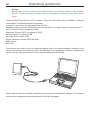
In addition it is possible that you must delete all devices connected to your mobile phone first in order
to enable a correct identification of the HFCK and the establishment of a connection. If you have queries regarding the menu navigation, functions and operation of your mobile phone, please refer to the
operating guidelines of your mobile phone. Depending on the manufacturer and type, this can differ
considerably between phones.
Note:
XXIf the rechargeable battery of the mobile phone is low, it is sometimes not possible to
establish a Bluetooth connection.
The HFCK has a memory for the storage of the identification of up to 10 mobile phones. In case an
eleventh mobile phone is connected, the oldest entry in the HFCK memory will be cancelled.
If you wish to cancel a Bluetooth connection, you can either disconnect it conveniently at the HFCK or
at your mobile phone. In addition, the connection is disconnected, if you move too far away from the
vehicle while taking your mobile phone with you and thus leave the reception radius of the HFCK.
Please note that the capacity of your mobile phone‘s storage battery can quickly decrease when the
Bluetooth function is active. If you do not want to use the Bluetooth function anymore, e.g. if you leave
the vehicle for a longer period, it is recommended to deactivate this function.
12. Menu navigation
Here you will find all menus which are necessary for the operation and configuration of the system.
These can be selected through the touch screen or using voice control.
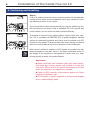
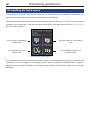
The menu items which are used most frequently are displayed on the main screen via text and symbols, all of the subsequent ones are displayed in text and table form. The first two functions change
as soon as a mobile phone connects with the HFCK in hands-free mode.
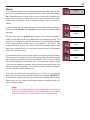
If no mobile phone is connected:
Day/Night mode
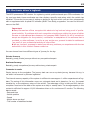
Auto connect If a mobile phone is connected:
Dial number
Phone book
This means you are able to quickly initialise important functions simply by touching the Touchscreen.
You are also able to select additional frequently used commands via voice control which otherwise first
appear later in the menu tree. These are as follows:
„DIAL JOE BLOGGS“,
„READ NEW TEXT MESSAGE“ and
„READ NEW EMAILS“.