1
4–2
Using RX and WX Instructions
Getting Started
RX / WX Network Instructions
Read (RX) and
Write (WX)
Instructions
The Read (RX) and Write (WX) instructions are used by the master PLC to Read a
block of data from another PLC or Write a block of data to another PLC. To perform
their functions, the RX / WX instructions must be preceded in the ladder logic
program by two Load instructions and one Load Address instruction.
The Load and Load Address instructions load communication parameters into the
accumulator and the first and second level of the accumulator stack. The RX or WX
instruction takes these parameters from the stack and the accumulator and
prepares the data to be sent over the network. If you need to know more about the
function of the accumulator and the accumulator stack, refer to the User Manual for
your PLC.
Building the
Read (RX) or
Write (WX)
Routine
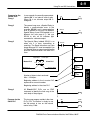
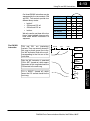
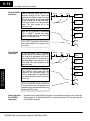
For network communications, you build
the Read (RX) or Write (WX) instructions
into a routine which requires the four
instructions you see to the right. The
function of each of these instructions is
explained on the following pages. They
must be used in the sequence shown.
LD
A aaa
LD
A aaa
RX / WX Instructions
for Communications
User Application
Guidelines
LDA
O aaa
RX or WX
A aaa
The First LD
Instruction
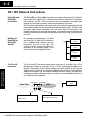
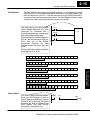
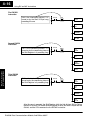
The first Load (LD) instruction accepts either a constant or a variable. Use a “K” to
designate the number as a constant. Use a “V” if you are entering the address of a
register. The contents of that register perform the same function as the constant
shown below. For example, you could use V2000 in place of K0114. If the contents of
V2000 is the number “114,” the function would be the same. Using a variable allows
changing parameters while the program is running. It is recommended, however, to
use a constant when possible.
Upper Byte
Master DCM
K 0 1 1 4
DCM Slot Number
Master PLC
LD
Lower Byte
K114
Slave
Slave Address # (Hex)
Slave Device on Network
DL05/06 Data Communications Module, 2nd Edition, 09/07