1
sinkcmp
9.0
Chapter 10.02
8.2.2
One of the SC1 mixture ratio is 10 ml hydrogen peroxide, 10 ml ammonium hydroxide &
1000 ml H2O and the PH = 10.
8.2.3
A force of attraction holds particles on substrates. The natural force favors the adhesion
of the water molecule over particles. This reduces particle adhesion and inhibits
depositing particles again. However, the air gap interferes with the wetting action and
reduces particle wetting. Cleaning with SC1 on bare silicon wafer will form an oxide layer
to reduce the hydrophobic qualities of the substrate and allow the particles above 1
micron to wet efficiently. Increase frequency in megasonic cleaning improves wetting
efficiency and helps removing small particles.
O pe rat ing Pr oc edu re
9.1
Enable sinkcmp on the Wand.
9.2
Remove the wafer from the wafer chuck after CMP polished.
9.3
Pick up the wafer with a pair of tweezers and rinse well with the water deck hose for 10 seconds.
9.4
Take wafer to the post CMP sink and lay the wafer on a clean texwipe.
9.5
Press one edge of the wafer with a pair of Teflon tweezers.
9.6
Apply directional cleaning strokes with a wet PVA sponge for 15 seconds.
Note:
This PVA sponge must kept clean and wet in the designated container on the sink top.
9.7
Rotate wafer 90°, rinse PVA sponge with D. I. water and repeat the directional cleaning strokes
for 15 seconds.
9.8
Put wafer in wafer cassette and attach the cassette handle on.
9.9
Put cassette with wafer in the water filled QDR tank immediately afterward.
9.10 Rinse wafer for 2 cycles.
Post CMP cleaning can be chosen individually afterward as an option shown below:
9.11 Option A – Spin dry
9.11.1
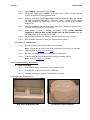
Use N2 gun to blow dry a 2” diameter on the center of the backside of the wafer.
9.11.2
Lift opens the Laurell spin dryer lid.
9.11.3
Place wafer on the center of the wafer chuck.
9.11.4
Close the lid.
9.11.5
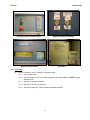
Press Program Select button until Program A is display on the right top corner of the
read out.
9.11.6
Press the Vacuum button to activate the vacuum.
Note:
Vacuum reading below 20 IOM indicates marginal vacuum. 15 IOM vacuum is
normally required to operate.
9.11.7
Press the Run button to spin dry the wafer. Press STOP if want to abort the spin dry
process.
9.11.8
After it is finish, press the Vacuum button to deactivate the vacuum.
9.11.9
Open the lid and remove the wafer.
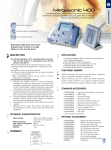
9.12 Option B – Megasonic clean
9.12.1
Flip the EMPTY toggle switch to OPEN to drain the solution in the megasonic bath.
9.12.2
Clean the tank with D. I. H2O.
-2-