1
GRIEVANCE REDRESS SYSTEM - User Manual For Public User - 2013
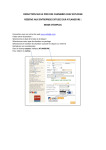
You will also be able to download or view user manual by clicking the image at right bottom
corner as „USER’S MANUAL’.
Since the system is available in dual language both in English & Nepali, You will also be able to
switch from „select language’ link at the right top below the national flag as per your language
comfort. Unicode is supported in Nepali language therefore we recommend you not to use any
other Nepali font.
3. LODGE GRIEVANCE
At the top of home page or any other pages, right below the header bar, you can see FOR
PUBLIC USE – LODGE GRIEVANCE & VIEW GRIEVANCE BUTTON. To lodge the
grievance, you need to click lodge grievance button and once it is clicked, you will see the form
with title „Lodge Your Grievance Here’.
3