1
BDP1300/F7
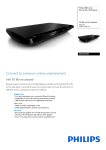
Blu-ray Disc/ DVD player
DVD video upscaling CinemaPerfect HD
Highlights
Enjoy movies and music
Dolby TrueHD
EasyLink
Enjoy all your movies and music from CD and
DVD
Dolby TrueHD deliver the finest sound from
your Blu-ray Discs. Audio reproduced is
virtually indistinguishable from the studio
master, so you hear what the creators intended
for you to hear. Dolby TrueHD complete your
high definition entertainment experience.
EasyLink lets you control multiple devices like
DVD players, Blu-ray players, TV's etc. with one
remote. It uses HDMI CEC industry-standard
protocol to share functionality between devices
through the HDMI cable. With one touch of a
button, you can operate all your connected
HDMI CEC enabled equipment simultaneously.
Functions like standby and play can now be
carried out with absolute ease.
Blu-ray Disc playback
DVD video upscaling
Subtitle Shift
Blu-ray Discs have the capacity to carry high
definition data, along with pictures in the 1920 x
1080 resolution that defines full high definition
images. Scenes come to life as details leap at you,
movements smoothen and images turn crystal
clear. Blu-ray also delivers uncompressed
surround sound - so your audio experience
becomes unbelievably real. The high storage
capacity of Blu-ray Discs also allow a host of
interactive possibilities to be built in. Seamless
navigation during playback and other exciting
features like pop-up menus bring a whole new
dimension to home entertainment.
HDMI 1080p upscaling delivers images that are
crystal clear. DVD movies in standard definition
can now be enjoyed in high definition resolution
- ensuring more details and more true-to-life
pictures. Progressive Scan (represented by "p" in
"1080p') eliminates the line structure prevalent
on TV screens, again ensuring relentlessly sharp
images. To top it off, HDMI makes a direct digital
connection that can carry uncompressed digital
HD video as well as digital multi-channel audio,
without conversions to analog - delivering
perfect picture and sound quality, completely
free from noise.
Subtitle Shift is an enhancement feature that lets
users manually adjust a movie's subtitle
positioning on the television or computer
screen. Using the remote control, users can shift
the subtitles up and down on the screen. On
widescreen displays, such as 21:9 cinema and
projectors, the subtitles sometimes get cut off.
In order to see them clearly, the user has to
change the display aspect ratio, which defeats
the purpose of the widescreen. With the
Subtitle Shift feature, the user can retain the
correct display aspect ratio and have the
subtitles ideally positioned on the screen.